Chapter 8: Layer Filters and Effects
Goal of this chapter: master the WhatsCanvas layer system and filter API; learn how to build blur, inner shadow, frosted glass, color adjustment, and filter chains.
For the Chinese version, see zh/08-layer-filters.md.
8.1 Layer System Basics
WhatsCanvas layer filters build on the saveLayer mechanism:
canvas->saveLayer(bounds, paint, options)
    → draw layer content
canvas->restore()
    → apply filters to the whole layer and composite it into the parent
LayerOptions exposes two key attributes:
- imageFilter — filter applied to the layer content (content filter)
- backdropFilter — filter applied to what is already behind the layer (backdrop filter)
8.2 Content Blur
Gaussian-blur the content drawn inside the layer:
wsc::Paint layerPaint;
layerPaint.setAlpha(255);

// Build a blur filter
auto blur = wsc::ImageFilter::blur(8.0f);

// Apply to the layer
canvas->saveLayer(wsc::RectF(50, 50, 300, 200), layerPaint,
    wsc::LayerOptions().setImageFilter(blur));

// Draw content in the layer (this content will be blurred)
wsc::Paint textPaint;
textPaint.setTextSize(24.0f);
textPaint.setColor(wsc::Color(33, 33, 33, 255));
canvas->drawText("This text will be blurred", 70, 130, textPaint);

canvas->restore();  // Blur takes effect here
Parameters
// Uniform radius
ImageFilter::blur(12.0f);

// Independent X/Y radii
ImageFilter::blur(16.0f, 4.0f);  // Strong horizontal blur, mild vertical

// Sigma (physical Gaussian parameter)
ImageFilter::blurSigma(4.0f);

// TileMode: how to treat edge pixels
ImageFilter::blur(8.0f, ImageFilter::TileMode::Clamp);  // Extend edges (default)
ImageFilter::blur(8.0f, ImageFilter::TileMode::Decal);  // Transparent edges
radius vs sigma:
radius ≈ sigma × 3. In most casesblur(radius)is more intuitive. The maximum blur radius is 64 px.
8.3 Backdrop Blur
Blur what is already drawn behind the layer — like iOS Notification Center:
// Draw background content first (images, text, ...)
canvas->drawImage(backgroundImage, 0, 0, wsc::Paint());

// Create a backdrop-blur layer
auto backdropBlur = wsc::ImageFilter::blur(12.0f);

canvas->saveLayer(wsc::RectF(50, 100, 300, 150), wsc::Paint(),
    wsc::LayerOptions().setBackdropFilter(backdropBlur));

// Draw the foreground on top of the blurred backdrop
wsc::Paint cardBg;
cardBg.setColor(wsc::Color(255, 255, 255, 180));  // Semi-transparent white
canvas->drawRoundRect(wsc::RectF(50, 100, 300, 150), 16.0f, cardBg);

wsc::Paint text;
text.setTextSize(18.0f);
text.setColor(wsc::Color(33, 33, 33, 255));
canvas->drawText("Card with backdrop blur", 70, 180, text);

canvas->restore();
8.4 Frosted Glass
frostedGlass is a high-level composite filter in WhatsCanvas — one call gives you a complete frosted-glass effect:
auto frosted = wsc::ImageFilter::frostedGlass(
    8.0f,    // blurSigma — blur strength
    1.18f,   // saturation — saturation boost
    1.04f,   // brightness — brightness tweak
    1.02f,   // contrast — contrast tweak
    0.012f   // grain — grain (simulates glass texture)
);

// Use as a backdrop filter
canvas->saveLayer(bounds, wsc::Paint(),
    wsc::LayerOptions().setBackdropFilter(frosted));

// Draw a semi-transparent overlay
wsc::Paint glass;
glass.setColor(wsc::Color(255, 255, 255, 40));
canvas->drawRoundRect(bounds, 20.0f, glass);

canvas->restore();
Parameter Tuning Guide
| Parameter | Typical Range | Effect |
|---|---|---|
blurSigma |
6–16 | Larger = more blurred |
saturation |
1.0–1.4 | > 1 boosts saturation |
brightness |
0.9–1.1 | > 1 brightens, < 1 darkens |
contrast |
0.9–1.1 | > 1 increases contrast |
grain |
0.005–0.02 | Adds noise / texture |
8.5 Inner Shadow
Draw a shadow inside a shape (like CSS box-shadow: inset):
auto innerShadow = wsc::ImageFilter::innerShadow(
    8.0f,                           // Blur radius
    2.0f, 4.0f,                     // X/Y offset
    wsc::Color(0, 0, 0, 128)       // Shadow color
);

canvas->saveLayer(bounds, wsc::Paint(),
    wsc::LayerOptions().setImageFilter(innerShadow));

// Draw the shape (the inner shadow appears along its inner edge)
wsc::Paint shapePaint;
shapePaint.setColor(wsc::Color(240, 240, 240, 255));
canvas->drawRoundRect(bounds, 16.0f, shapePaint);

canvas->restore();
Variants
// Uniform radius
ImageFilter::innerShadow(8.0f, 2.0f, 4.0f, shadowColor);

// Independent X/Y radii
ImageFilter::innerShadow(12.0f, 6.0f, 2.0f, 4.0f, shadowColor);

// Sigma variant
ImageFilter::innerShadowSigma(3.0f, 2.0f, 4.0f, shadowColor);
8.6 Color Adjustment
Via Filters
ImageFilter supports optional color adjustment:
auto filter = wsc::ImageFilter::blur(4.0f);
filter.setColorAdjustment(
    1.3f,   // saturation
    1.1f,   // brightness
    1.05f   // contrast
);
filter.setGrain(0.01f);  // grain
Via Color Matrix
A color matrix applies any linear transform on pixels (4×5 = 20 floats):
// Grayscale
std::array<float, 20> grayscale = {
    0.2126f, 0.7152f, 0.0722f, 0, 0,
    0.2126f, 0.7152f, 0.0722f, 0, 0,
    0.2126f, 0.7152f, 0.0722f, 0, 0,
    0,       0,       0,       1, 0,
};

// Sepia
std::array<float, 20> sepia = {
    0.393f, 0.769f, 0.189f, 0, 0,
    0.349f, 0.686f, 0.168f, 0, 0,
    0.272f, 0.534f, 0.131f, 0, 0,
    0,      0,      0,      1, 0,
};

// Invert
std::array<float, 20> invert = {
    -1, 0,  0,  0, 255,
    0,  -1, 0,  0, 255,
    0,  0,  -1, 0, 255,
    0,  0,  0,  1, 0,
};
8.7 Filter Chain (ImageFilterChain)
Chain multiple filters (up to 8 nodes):
wsc::ImageFilterChain chain;

// First blur
chain.append(wsc::ImageFilter::blur(6.0f));

// Then apply a color matrix (e.g. lower saturation)
std::array<float, 20> desaturate = {
    0.5f, 0.5f, 0.0f, 0, 0,
    0.2f, 0.7f, 0.1f, 0, 0,
    0.1f, 0.3f, 0.6f, 0, 0,
    0,    0,    0,    1, 0,
};
chain.appendColorMatrix(desaturate);

// Finally add an offset
chain.appendOffset(4.0f, 4.0f);

// Apply to the layer
canvas->saveLayer(bounds, wsc::Paint(),
    wsc::LayerOptions().setImageFilter(chain));
// ... draw ...
canvas->restore();
Filter Chains Work as Backdrops Too
wsc::ImageFilterChain backdropChain;
backdropChain.append(wsc::ImageFilter::blur(10.0f));
backdropChain.appendColorMatrix(warmTintMatrix);

canvas->saveLayer(bounds, wsc::Paint(),
    wsc::LayerOptions().setBackdropFilter(backdropChain));
8.8 Content + Backdrop Filters Together
auto backdropFrosted = wsc::ImageFilter::frostedGlass(8.0f);
auto contentShadow = wsc::ImageFilter::innerShadow(6, 0, 2, wsc::Color(0,0,0,80));

wsc::LayerOptions opts;
opts.setBackdropFilter(backdropFrosted);  // Frosted-glass backdrop
opts.setImageFilter(contentShadow);        // Content inner shadow

canvas->saveLayer(bounds, wsc::Paint(), opts);

// Draw foreground content
wsc::Paint card;
card.setColor(wsc::Color(255, 255, 255, 60));
canvas->drawRoundRect(bounds, 20.0f, card);

canvas->restore();
8.9 Integrated Example: iOS-Style Notification Panel
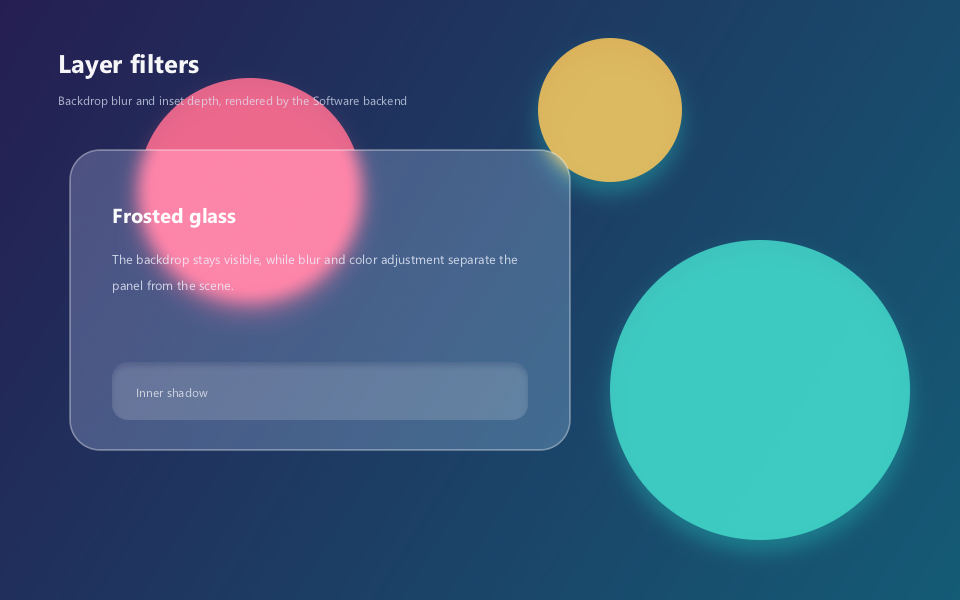
The key point: colored circles are drawn to the background first; backdropFilter processes only the pixels behind the panel. The input field uses innerShadow to add inset depth. The code below matches the compilable source that produced the picture.
// Chapter 08 comprehensive example: frosted glass and inner shadow.
#include <wsc/FontSystem.h>
#include <wsc/wsc.h>

int main()
{
    // 1. Create the canvas and register the system fonts used in the UI text.
    auto canvas = wsc::Canvas::create(wsc::Canvas::Backend::Software, 960, 600);
    if (!canvas || !canvas->initializeContext()) return 1;
    for (const auto &face : wsc::FontSystem::defaultSystemFontFaces()) {
        canvas->registerFontFace(face);
    }
    canvas->setFontFallbackChain(wsc::FontSystem::defaultFallbackChain());

    // 2. Draw the gradient background and three colored orbs; they are the input for the frosted glass.
    canvas->beginFrame();
    wsc::Paint background;
    background.setLinearGradient(0, 0, 960, 600,
        wsc::Color(37, 30, 82, 255), wsc::Color(20, 91, 118, 255));
    canvas->drawRect(wsc::RectF(0, 0, 960, 600), background);

    wsc::Paint orb;
    orb.setAntiAlias(true);
    orb.setColor(wsc::Color(255, 111, 145, 220));
    orb.setShadowLayer(28, 0, 12, wsc::Color(255, 95, 142, 95));
    canvas->drawCircle(250, 190, 112, orb);
    orb.setColor(wsc::Color(66, 215, 202, 220));
    orb.setShadowLayer(30, 0, 12, wsc::Color(39, 210, 196, 90));
    canvas->drawCircle(760, 390, 150, orb);
    orb.setColor(wsc::Color(254, 199, 90, 215));
    canvas->drawCircle(610, 110, 72, orb);

    // 3. Draw the page title.
    wsc::Paint title;
    title.setColor(wsc::Color(255, 255, 255, 245));
    title.setTextSize(34.0f);
    title.setFontWeight(650);
    title.setTextBaseline(wsc::Paint::TextBaseline::MIDDLE);
    canvas->drawText("Layer filters", 58, 62, title);
    title.setTextSize(16.0f);
    title.setFontWeight(400);
    title.setColor(wsc::Color(225, 232, 249, 190));
    canvas->drawText("Backdrop blur and inset depth, rendered by the Software backend", 58, 100, title);

    // 4. backdropFilter processes pixels already drawn behind the panel.
    const wsc::RectF glassBounds(70, 150, 500, 300);
    wsc::Paint composite;
    composite.setColor(wsc::Color(255, 255, 255, 255));
    wsc::LayerOptions glass;
    glass.setBackdropFilter(wsc::ImageFilter::frostedGlass(8.0f, 1.16f, 1.04f, 1.02f, 0.004f));

    // saveLayer's bounds are rectangular; clip to a rounded-rect path first so the
    // backdropFilter result does not leak past the rounded corners.
    canvas->save();
    wsc::Path glassClip;
    glassClip.addRoundRect(glassBounds, 30.0f);
    canvas->clipPath(glassClip);
    canvas->saveLayer(glassBounds, composite, glass);
    wsc::Paint tint;
    tint.setColor(wsc::Color(239, 246, 255, 54));
    tint.setAntiAlias(true);
    canvas->drawRoundRect(glassBounds, 30, tint);
    canvas->restore(); // Composite the frosted-glass layer.
    canvas->restore(); // Release the rounded-rect clip.

    wsc::Paint border;
    border.setStyle(wsc::Paint::Style::STROKE);
    border.setStrokeWidth(1.5f);
    border.setColor(wsc::Color(255, 255, 255, 105));
    border.setAntiAlias(true);
    canvas->drawRoundRect(glassBounds, 30, border);

    // 5. Panel content is drawn after restore, so the text itself is not blurred.
    wsc::Paint glassTitle = title;
    glassTitle.setColor(wsc::Color(255, 255, 255, 250));
    glassTitle.setTextSize(27.0f);
    glassTitle.setFontWeight(650);
    canvas->drawText("Frosted glass", 112, 215, glassTitle);
    glassTitle.setTextSize(17.0f);
    glassTitle.setFontWeight(400);
    glassTitle.setColor(wsc::Color(239, 244, 255, 205));
    glassTitle.setTextBaseline(wsc::Paint::TextBaseline::TOP);
    canvas->drawTextBox("The backdrop stays visible, while blur and color adjustment separate the panel from the scene.",
                        wsc::RectF(112, 250, 410, 100), 26.0f, 3, true, glassTitle);

    // 6. imageFilter processes only the current layer content; it drives the input field's inner shadow.
    const wsc::RectF fieldBounds(112, 362, 416, 58);
    wsc::LayerOptions inset;
    inset.setImageFilter(wsc::ImageFilter::innerShadow(8.0f, 0, 4, wsc::Color(13, 23, 50, 125)));
    canvas->saveLayer(fieldBounds, composite, inset);
    wsc::Paint field;
    field.setColor(wsc::Color(255, 255, 255, 42));
    field.setAntiAlias(true);
    canvas->drawRoundRect(fieldBounds, 16, field);
    canvas->restore();
    glassTitle.setTextSize(16.0f);
    glassTitle.setColor(wsc::Color(255, 255, 255, 175));
    glassTitle.setTextBaseline(wsc::Paint::TextBaseline::MIDDLE);
    canvas->drawText("Inner shadow", 136, 392, glassTitle);

    // 7. Submit and save the filter effect picture.
    canvas->endFrame();
    return canvas->savePixelsPPM("chapter08_filters.ppm") ? 0 : 2;
}
8.10 Performance Notes
Layer filters cost extra GPU render passes. Keep these in mind:
| Guideline | Reason |
|---|---|
| Restrict the filter area | Blur cost scales with area |
| Avoid deeply nested layers | Each saveLayer allocates an offscreen buffer |
| Keep blur radius reasonable | Max 64 px; huge radii degrade quickly |
| Cache static content with Pictures | drawPictureRasterized avoids re-filtering every frame |
| Backdrop filters cost more than content filters | They must read and process already-rendered content |
8.11 API Cheat Sheet
| API | Description |
|---|---|
ImageFilter::blur(r) |
Gaussian blur |
ImageFilter::blur(rx, ry) |
XY-independent blur |
ImageFilter::blurSigma(s) |
Blur by sigma |
ImageFilter::innerShadow(r, dx, dy, color) |
Inner shadow |
ImageFilter::frostedGlass(blur, sat, brt, ctr, grain) |
Frosted glass |
filter.setColorAdjustment(sat, brt, ctr) |
Color adjustment |
filter.setGrain(amount) |
Grain |
ImageFilterChain::append(filter) |
Add a filter node |
ImageFilterChain::appendColorMatrix(m) |
Add a color matrix |
ImageFilterChain::appendOffset(dx, dy) |
Add an offset |
LayerOptions::setImageFilter(f) |
Set the content filter |
LayerOptions::setBackdropFilter(f) |
Set the backdrop filter |
8.12 Summary
This chapter covered:
- [x] The layer system (saveLayer + LayerOptions)
- [x] Content blur and backdrop blur
- [x] Frosted glass
- [x] Inner shadow
- [x] Color matrix transforms
- [x] Filter chains (ImageFilterChain)
- [x] Combining content and backdrop filters
- [x] Performance considerations
Next chapter: Windowed Presentation and Interaction — display rendering results in a window and handle user input.