Chapter 6: Image Drawing
Goal of this chapter: learn how to load image assets, how to draw them with various options (fit, crop, rounded corners, nine-patch, tiling), and how to interoperate with external textures.
For the Chinese version, see zh/06-image-bindrawing.md.
6.1 The Image Object
wsc::Image wraps a GPU texture resource. Its lifetime is bound to a Canvas — you need a Canvas reference to load it.
wsc::Image image;  // Empty Image object

// After loading, image holds a GPU texture handle.
// When the Image is destroyed, the resource is released automatically.
Note: Image is non-copyable but movable:
6.2 Loading Images
From a File Path
wsc::Image image;
bool ok = canvas->loadImage(image, "assets/photo.png");
if (!ok) {
    // Handle load failure
}
PNG and JPEG are supported.
From Encoded Memory
When the image data is already in memory (from network download, an asset bundle, ...):
// data is raw PNG/JPEG bytes
std::vector<unsigned char> pngData = loadFromNetwork("...");

wsc::Image image;
bool ok = canvas->loadImageFromEncodedMemory(
    image, pngData.data(), pngData.size(), true /*generateMipmaps*/);
From Raw RGBA Pixels
int w = 64, h = 64;
std::vector<unsigned char> pixels(w * h * 4, 255);  // All white

// Paint a red square
for (int y = 10; y < 50; ++y)
    for (int x = 10; x < 50; ++x) {
        int idx = (y * w + x) * 4;
        pixels[idx + 0] = 255;  // R
        pixels[idx + 1] = 0;    // G
        pixels[idx + 2] = 0;    // B
        pixels[idx + 3] = 255;  // A
    }

wsc::Image image;
canvas->loadImageFromRGBA(image, pixels.data(), w, h);
6.3 Basic Drawing
At Native Size
// Draw the image at its native size at position (x, y)
canvas->drawImage(image, 50.0f, 50.0f, paint);
Scaled to a Region
// Stretch the image into the target rectangle
canvas->drawImage(image, wsc::RectF(50, 50, 300, 200), paint);
Source → Destination (partial draw)
// Draw only the top-left quarter, scaled to fill the target
wsc::RectF src(0, 0, image.getWidth() / 2.0f, image.getHeight() / 2.0f);
wsc::RectF dst(50, 50, 300, 200);
canvas->drawImage(image, src, dst, paint);
Ordered atlas rectangles (since 1.2.0)
Available since WhatsCanvas 1.2.0.
With an already loaded image atlas at least 64 by 32 pixels and an existing
imagePaint, submit several regions using one image, paint and canvas state:
wsc::Canvas::ImageRect rects[] = {
    {wsc::RectF(0, 0, 32, 32), wsc::RectF(20, 20, 48, 48)},
    {wsc::RectF(32, 0, 32, 32), wsc::RectF(80, 20, 48, 48)}
};
canvas->drawImageRects(atlas, rects, 2, imagePaint);
The output follows the input order, including overlap, source clamping and
destination normalization. The call consumes the rectangle array before it
returns, but GPU execution may finish later. Complex sampling, color matrices
and Picture recording fall back to individual drawImage calls. This reduces
repeated submission work; it does not guarantee a single GPU draw call.
6.4 Fit Modes (ImageFit)
Similar to CSS object-fit, controls how the image fits into the target region:
wsc::RectF dst(50, 50, 300, 200);

// CONTAIN: show the whole image, may leave empty space
canvas->drawImageFit(image, dst, wsc::Canvas::ImageFit::CONTAIN, paint);

// COVER: fill the region, may crop edges
canvas->drawImageFit(image, dst, wsc::Canvas::ImageFit::COVER, paint);

// FILL: stretch to fill (default)
canvas->drawImageFit(image, dst, wsc::Canvas::ImageFit::FILL, paint);
Anchor
For COVER, specify which region to preserve:
// Preserve the top of the image (keep a portrait's head)
canvas->drawImageFit(image, dst, wsc::Canvas::ImageFit::COVER,
    wsc::Canvas::ImageAnchor::TOP, paint);

// Custom anchor (0–1, 0–1)
canvas->drawImageFit(image, dst, wsc::Canvas::ImageFit::COVER,
    0.5f, 0.3f, paint);  // Point of interest is above center
6.5 Rounded Images
Uniform Corner Radius
Per-Corner Radii
canvas->drawImageRounded(image, wsc::RectF(50, 50, 200, 200),
    30.0f,  // Top-left
    10.0f,  // Top-right
    30.0f,  // Bottom-right
    10.0f,  // Bottom-left
    paint);
Circular Image (Avatar)
// Draw the image cropped to a circle
canvas->drawImageCircle(image, wsc::PointF(150, 150), 60.0f, paint);
6.6 Nine-Patch
Nine-patch is used for stretchable UI elements (button backgrounds, dialog bubbles, ...). The four corners stay at native size, the edges stretch, and the center tiles.
// centerSrc: the stretchable center region in source coordinates
wsc::RectF centerSrc(20, 20, 60, 60);  // Assuming a 100x100 image with 20px insets

// dst: the target drawing region
wsc::RectF dst(50, 50, 300, 100);

canvas->drawImageNinePatch(image, centerSrc, dst, paint);
6.7 Tiling
Repeat the image to fill the target region (similar to CSS background-repeat):
// Tile at native size
canvas->drawImageTiled(image, wsc::RectF(0, 0, 400, 400), paint);

// Specify tile size
canvas->drawImageTiled(image, wsc::RectF(0, 0, 400, 400),
    64.0f, 64.0f, paint);  // 64x64 tiles
6.8 Image Updates
Replace All Pixels
// Replace the entire content (size may change)
std::vector<unsigned char> newPixels = generateFrame();
canvas->replaceImageRGBA(image, newPixels.data(), newW, newH);
Partial Update
Update only a rectangular sub-region (for video frames or dynamic textures):
// Update a 32x32 region at (10, 10)
canvas->updateImageRGBA(image, subPixels.data(), 10, 10, 32, 32);
6.9 External Texture Interop
OpenGL Texture
If you already have an OpenGL texture, let WhatsCanvas draw it directly:
GLuint texId = ...; // Externally created OpenGL texture
int texW = 512, texH = 512;

wsc::Image image;
canvas->wrapExternalTexture(image, texId, texW, texH);
canvas->drawImage(image, wsc::RectF(0, 0, 400, 400), paint);
Metal Texture
id<MTLTexture> mtlTex = ...;
wsc::Image image;
canvas->wrapExternalMetalTexture(image, (__bridge void*)mtlTex, w, h);
6.10 Image Sampling Configuration
Control image sampling and filtering through the Paint:
wsc::Paint imgPaint;

// Sampling quality when scaling
imgPaint.setImageSampling(wsc::Paint::ImageSampling::LINEAR);       // Default
imgPaint.setImageSampling(wsc::Paint::ImageSampling::NEAREST);      // Pixel-art style
imgPaint.setImageSampling(wsc::Paint::ImageSampling::MIPMAP_LINEAR);// Best for downscaling

// Behavior outside the image bounds
imgPaint.setImageTileMode(wsc::Paint::ImageTileMode::CLAMP);    // Extend edge pixels
imgPaint.setImageTileMode(wsc::Paint::ImageTileMode::REPEAT);   // Repeat
imgPaint.setImageTileMode(wsc::Paint::ImageTileMode::MIRROR);   // Mirror
imgPaint.setImageTileMode(wsc::Paint::ImageTileMode::DECAL);    // Transparent
6.11 Integrated Example: Image Gallery
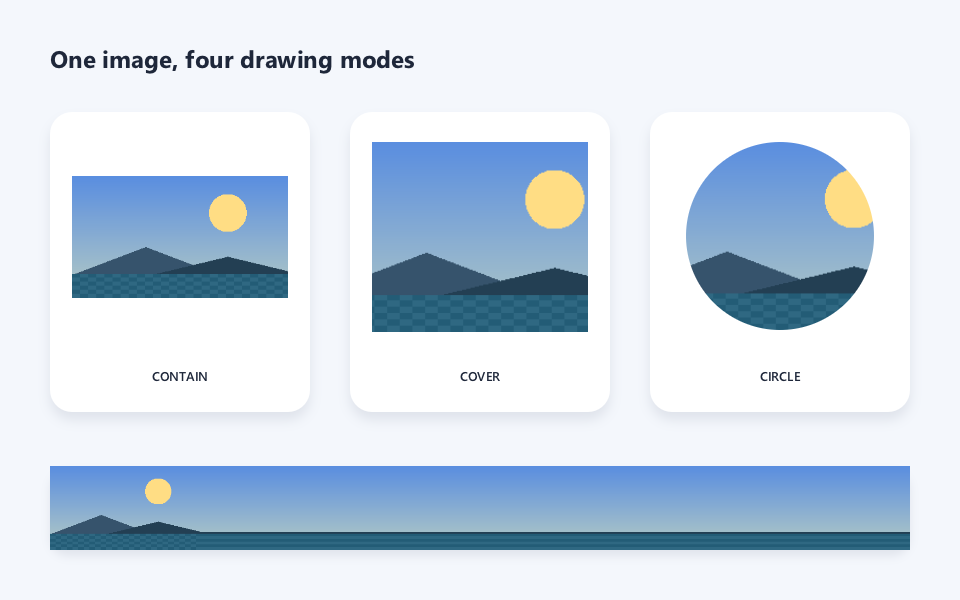
The example uses loadImageFromRGBA to synthesize a test image in memory, so the tutorial does not depend on external assets. The code below matches the compilable source that produced the picture.
// Chapter 06 comprehensive example: image fit, circular crop and tiling.
#include <wsc/FontSystem.h>
#include <wsc/wsc.h>

#include <cmath>
#include <vector>

namespace {

std::vector<unsigned char> makeLandscape(int width, int height)
{
    // Generate an RGBA test picture in memory so the tutorial does not depend on external assets.
    std::vector<unsigned char> pixels(static_cast<std::size_t>(width) * height * 4u);
    for (int y = 0; y < height; ++y) {
        for (int x = 0; x < width; ++x) {
            const float fy = static_cast<float>(y) / height;
            unsigned char r = static_cast<unsigned char>(90 + 92 * fy);
            unsigned char g = static_cast<unsigned char>(142 + 62 * fy);
            unsigned char b = static_cast<unsigned char>(224 - 28 * fy);
            // Sun in the sky.
            const float sunDx = x - width * 0.72f;
            const float sunDy = y - height * 0.30f;
            if (sunDx * sunDx + sunDy * sunDy < 28.0f * 28.0f) {
                r = 255; g = 221; b = 132;
            }
            // Two mountain ridges and a water region at the bottom.
            const float ridgeA = height * 0.58f + std::abs(x - width * 0.34f) * 0.38f;
            const float ridgeB = height * 0.66f + std::abs(x - width * 0.72f) * 0.24f;
            if (y > ridgeA) { r = 54; g = 83; b = 108; }
            if (y > ridgeB) { r = 35; g = 63; b = 83; }
            if (y > height * 0.80f) {
                const int shimmer = ((x / 12 + y / 6) % 2) * 12;
                r = static_cast<unsigned char>(35 + shimmer);
                g = static_cast<unsigned char>(92 + shimmer);
                b = static_cast<unsigned char>(118 + shimmer);
            }
            const std::size_t index = (static_cast<std::size_t>(y) * width + x) * 4u;
            pixels[index] = r; pixels[index + 1] = g; pixels[index + 2] = b; pixels[index + 3] = 255;
        }
    }
    return pixels;
}

} // namespace

int main()
{
    // 1. Create the canvas and register the system fonts used for the title and labels.
    auto canvas = wsc::Canvas::create(wsc::Canvas::Backend::Software, 960, 600);
    if (!canvas || !canvas->initializeContext()) return 1;
    for (const auto &face : wsc::FontSystem::defaultSystemFontFaces()) {
        canvas->registerFontFace(face);
    }
    canvas->setFontFallbackChain(wsc::FontSystem::defaultFallbackChain());

    // 2. Upload the in-memory RGBA pixels as an Image.
    wsc::Image photo;
    const auto pixels = makeLandscape(320, 180);
    if (!canvas->loadImageFromRGBA(photo, pixels, 320, 180, true)) return 2;

    // 3. Draw the page background and title.
    canvas->beginFrame();
    wsc::Paint background;
    background.setColor(wsc::Color(244, 247, 252, 255));
    canvas->drawRect(wsc::RectF(0, 0, 960, 600), background);

    wsc::Paint title;
    title.setColor(wsc::Color(30, 39, 58, 255));
    title.setTextSize(32.0f);
    title.setFontWeight(650);
    title.setTextBaseline(wsc::Paint::TextBaseline::MIDDLE);
    canvas->drawText("One image, four drawing modes", 50, 58, title);

    wsc::Paint imagePaint;
    imagePaint.setColor(wsc::Color(255, 255, 255, 255));
    imagePaint.setAntiAlias(true);
    imagePaint.setImageSampling(wsc::Paint::ImageSampling::MIPMAP_LINEAR);

    // 4. Three white panels reuse the same layout helper.
    auto panel = [&](float x, const char *label) {
        const wsc::RectF bounds(x, 112, 260, 300);
        canvas->drawBoxShadow(bounds, 22, 0, 18, 0, 8, wsc::Color(35, 49, 83, 26));
        wsc::Paint surface;
        surface.setColor(wsc::Color(255, 255, 255, 255));
        surface.setAntiAlias(true);
        canvas->drawRoundRect(bounds, 22, surface);
        wsc::Paint caption = title;
        caption.setTextSize(17.0f);
        caption.setFontWeight(600);
        caption.setTextAlign(wsc::Paint::TextAlign::CENTER);
        canvas->drawText(label, x + 130, 376, caption);
    };

    panel(50, "CONTAIN");
    panel(350, "COVER");
    panel(650, "CIRCLE");

    // 5. Show the same image in CONTAIN, COVER, and circular crop.
    canvas->drawImageFit(photo, wsc::RectF(72, 142, 216, 190), wsc::Canvas::ImageFit::CONTAIN, imagePaint);
    canvas->drawImageFit(photo, wsc::RectF(372, 142, 216, 190), wsc::Canvas::ImageFit::COVER, imagePaint);
    canvas->drawImageCircle(photo, wsc::PointF(780, 236), 94, imagePaint);

    // 6. The bottom region demonstrates tiling with an explicit tile size.
    const wsc::RectF tiledBounds(50, 466, 860, 84);
    canvas->drawBoxShadow(tiledBounds, 18, 0, 14, 0, 6, wsc::Color(35, 49, 83, 24));
    canvas->drawImageTiled(photo, tiledBounds, 150, 84, imagePaint);

    // 7. Emit the picture that matches the tutorial image.
    canvas->endFrame();
    return canvas->savePixelsPPM("chapter06_gallery.ppm") ? 0 : 3;
}
6.12 API Cheat Sheet
| Method | Description |
|---|---|
loadImage(img, path) |
Load PNG/JPEG from a file |
loadImageFromEncodedMemory(...) |
Load from an encoded memory buffer |
loadImageFromRGBA(...) |
Load from raw RGBA pixels |
drawImage(img, x, y, paint) |
Draw at native size |
drawImage(img, dst, paint) |
Stretch to a region |
drawImage(img, src, dst, paint) |
Map a source region to a destination |
drawImageRects(img, rects, count, paint) |
Ordered atlas regions (since 1.2.0) |
drawImageFit(img, dst, fit, paint) |
CONTAIN / COVER / FILL |
drawImageRounded(img, dst, r, paint) |
Rounded image |
drawImageCircle(img, center, r, paint) |
Circular image |
drawImageNinePatch(img, src, dst, paint) |
Nine-patch stretch |
drawImageTiled(img, dst, paint) |
Tile |
replaceImageRGBA(...) |
Replace all pixels |
updateImageRGBA(...) |
Partial pixel update |
wrapExternalTexture(...) |
Wrap an OpenGL texture |
6.13 Summary
This chapter covered:
- [x] Image object creation and lifetime
- [x] Three loading paths (file / encoded memory / raw pixels)
- [x] Basic drawing and region mapping
- [x] ImageFit modes and anchor
- [x] Rounded and circular images
- [x] Nine-patch stretch
- [x] Tiling
- [x] Dynamic pixel updates
- [x] External texture interop
- [x] Sampling and tile configuration
Next chapter: Text Layout — font registration, text drawing, multi-line layout, and text on path.