Chapter 7: Text Layout
Goal of this chapter: master the WhatsCanvas text system — font registration and fallback, single- and multi-line text, text measurement, CJK/RTL layout, and text on path.
For the Chinese version, see zh/07-text-bindlayout.md.
7.1 Text System Overview
The WhatsCanvas text system does much more than "draw characters":
- Font discovery: automatic system font discovery (Windows / Linux / macOS)
- Fallback chain: falls back to alternative fonts when the primary font is missing a glyph
- HarfBuzz shaping: correct shaping of complex scripts (Arabic, Devanagari, ...)
- UAX #9 bidi: mixed RTL and LTR text
- CJK layout: no-space line breaking, punctuation kinsoku
- Color emoji: COLR/CPAL v0 and common COLRv1
7.2 Font Registration
Use the Built-In Default Fonts
WhatsCanvas ships a built-in fallback font set for scenarios without external fonts:
#include <wsc/FontSystem.h>

// Register the default system fonts
for (const auto& face : wsc::FontSystem::defaultSystemFontFaces()) {
    canvas->registerFontFace(face);
}

// Set the fallback chain
canvas->setFontFallbackChain(wsc::FontSystem::defaultFallbackChain());
Register a Custom Font from a File
wsc::FontDescriptor desc("MyFont", 400, wsc::FontSlant::NORMAL);
wsc::FontFace face = wsc::FontFace::fromFile(desc, "/path/to/MyFont-Regular.ttf");
canvas->registerFontFace(face);

// Register the bold variant
wsc::FontDescriptor boldDesc("MyFont", 700, wsc::FontSlant::NORMAL);
wsc::FontFace boldFace = wsc::FontFace::fromFile(boldDesc, "/path/to/MyFont-Bold.ttf");
canvas->registerFontFace(boldFace);
Register from Memory
std::vector<uint8_t> fontData = loadFontFromResource();
wsc::FontDescriptor desc("EmbeddedFont");
wsc::FontFace face = wsc::FontFace::fromMemory(desc, std::move(fontData));
canvas->registerFontFace(face);
Font with a Codepoint Range
When you want a font to handle only specific Unicode ranges:
wsc::FontFace emojiFace = wsc::FontFace::fromFile(
    wsc::FontDescriptor("Emoji"), "/path/to/NotoColorEmoji.ttf");
emojiFace.addCodepointRange(0x1F600, 0x1F64F);  // Emoticons
emojiFace.addCodepointRange(0x1F300, 0x1F5FF);  // Symbols
canvas->registerFontFace(emojiFace);
7.3 Native Platform Text Backends
WhatsCanvas can use the native platform text engine for better system consistency:
// Windows: use DirectWrite
canvas->setTextBackend(wsc::Canvas::TextBackend::DirectWrite);

// macOS / iOS: use CoreText
canvas->setTextBackend(wsc::Canvas::TextBackend::CoreText);

// Cross-platform default: FreeType + HarfBuzz
canvas->setTextBackend(wsc::Canvas::TextBackend::Portable);
7.4 Single-Line Text
Font Size Uses Logical Units, Not Platform sp
Paint::setTextSize takes Canvas logical units. It does not consult Android density, user font size, or the Web CSS pipeline, so you cannot call the value "px", "dp", or "sp" without accounting for DPR.
If a 720-pixel-wide Canvas uses DPR 2, the logical width is 360. Then setTextSize(16) lays out with 16 logical units and rasterizes at about 32 physical pixels, which is close to the visual baseline of Android 16 sp under default font settings. Without a DPR, the same 16 produces only about 16 physical pixels.
Android also needs to respect the user's font size. The host should compute the pixel size via TypedValue.applyDimension(COMPLEX_UNIT_SP, value, metrics) and then divide by the density it passes to the Canvas:
Do not use bold weight to compensate for a wrong text size or DPR. Body text usually starts at weight 400; only reach for 500 or 600 when the design genuinely calls for emphasis.
Basic Drawing
wsc::Paint textPaint;
textPaint.setColor(wsc::Color(33, 33, 33, 255));
textPaint.setTextSize(24.0f);
textPaint.setFontFamily("Arial");

// drawText(text, x, y, paint)
// (x, y) is the start of the text baseline
canvas->drawText("Hello, WhatsCanvas!", 50, 100, textPaint);
Text Alignment
float centerX = 200;

wsc::Paint left;
left.setTextSize(20.0f);
left.setTextAlign(wsc::Paint::TextAlign::LEFT);    // Default
canvas->drawText("Left aligned", centerX, 60, left);

wsc::Paint center;
center.setTextSize(20.0f);
center.setTextAlign(wsc::Paint::TextAlign::CENTER);
canvas->drawText("Center aligned", centerX, 100, center);

wsc::Paint right;
right.setTextSize(20.0f);
right.setTextAlign(wsc::Paint::TextAlign::RIGHT);
canvas->drawText("Right aligned", centerX, 140, right);
Font Style
wsc::Paint paint;
paint.setTextSize(20.0f);

// Family
paint.setFontFamily("Roboto");

// Weight (100–1000, 400=normal, 700=bold)
paint.setFontWeight(700);

// Italic
paint.setFontSlant(wsc::FontSlant::ITALIC);

// Letter spacing
paint.setLetterSpacing(2.0f);

// Underline
paint.setUnderline(true);

// Strikethrough
paint.setStrikethrough(true);
OpenType Features
// Enable ligatures
paint.setFontFeature("liga", 1);

// Disable ligatures
paint.setFontFeature("liga", 0);

// Tabular numbers
paint.setFontFeature("tnum", 1);

// Oldstyle numbers
paint.setFontFeature("onum", 1);
7.5 Text Measurement
Width
Full Metrics
wsc::Canvas::TextMetrics metrics = canvas->measureTextMetrics("Hello", textPaint);

// metrics.width      — Text width
// metrics.height     — Line height
// metrics.ascent     — Height above baseline (negative)
// metrics.descent    — Depth below baseline
// metrics.lineGap    — Recommended line gap
// metrics.lineHeight — Recommended line height (ascent + descent + lineGap)
// metrics.bounds     — Ink bounding box (RectF)
Bounding Box
wsc::RectF bounds = canvas->measureTextBounds("Hello", textPaint);
// bounds is the exact pixel bounding box
7.6 Multi-Line Text
Basic Multi-Line
wsc::Paint paint;
paint.setTextSize(16.0f);
paint.setColor(wsc::Color(33, 33, 33, 255));

// drawTextBox(text, bounds, paint)
// Text is wrapped automatically inside `bounds`
canvas->drawTextBox(
    u8"WhatsCanvas supports multi-line text. Text is wrapped automatically inside "
    u8"the specified rectangle and respects rules such as CJK no-space wrapping and "
    u8"punctuation kinsoku.",
    wsc::RectF(50, 50, 300, 200),
    paint
);
Explicit Line Height
// drawTextBox(text, bounds, lineHeight, paint)
canvas->drawTextBox(
    u8"This paragraph uses 1.8x line height.",
    wsc::RectF(50, 50, 300, 200),
    1.8f,   // Line-height multiplier
    paint
);
Max Lines + Ellipsis
// drawTextBox(text, bounds, lineHeight, maxLines, ellipsize, paint)
canvas->drawTextBox(
    u8"This is a long paragraph that will be truncated with an ellipsis after the "
    u8"maximum number of lines. WhatsCanvas computes the break position so the "
    u8"ellipsis lands where it should.",
    wsc::RectF(50, 50, 250, 100),
    1.5f,    // Line height
    3,       // Max 3 lines
    true,    // Enable ellipsis
    paint
);
Retrieve Layout Result
You can obtain the per-line layout details for custom rendering or hit-testing:
auto lines = canvas->layoutTextBox(
    u8"First line.\nSecond line that wraps around.",
    wsc::RectF(0, 0, 200, 400),
    1.5f, 0, false, paint
);

for (const auto& line : lines) {
    // line.text         — Text of this line
    // line.x, line.y    — Drawing coordinates
    // line.width        — Line width
    // line.lineHeight   — Line height
    // line.ellipsized   — Whether the line was truncated with an ellipsis
    // line.sourceStart  — Offset in the original text
    // line.sourceLength — Number of characters from the source
}
7.7 Text Effects
Outlined Text
wsc::Paint strokeText;
strokeText.setTextSize(48.0f);
strokeText.setStyle(wsc::Paint::Style::STROKE);
strokeText.setStrokeWidth(2.0f);
strokeText.setColor(wsc::Color(33, 33, 33, 255));
canvas->drawText("Outline", 50, 100, strokeText);
Gradient Text
wsc::Paint gradText;
gradText.setTextSize(48.0f);
gradText.setLinearGradient(50, 0, 350, 0,
    wsc::Color(255, 0, 128, 255), wsc::Color(0, 128, 255, 255));
canvas->drawText("Gradient Text", 50, 100, gradText);
Shadow Text
wsc::Paint shadowText;
shadowText.setTextSize(36.0f);
shadowText.setColor(wsc::Color(255, 255, 255, 255));
shadowText.setShadowLayer(6.0f, 2.0f, 3.0f, wsc::Color(0, 0, 0, 150));
canvas->drawText("Shadow Text", 50, 100, shadowText);
Glyph coverage-mask blur (since 1.2.0)
Available since WhatsCanvas 1.2.0.
setTextMaskBlur(radius) softens each glyph's coverage mask before applying the
text color. The mask records opacity rather than final RGB values. It can be
reused when the same glyph, font settings and blur radius are drawn with another
color or at another position.
For a soft text shadow, draw an offset blurred copy followed by sharp text:
wsc::Paint text;
text.setTextSize(48.0f);
text.setTextMaskBlur(3.0f);
text.setColor(wsc::Color(0, 0, 0, 120));
canvas->drawText("Soft text", 42, 82, text);

text.setTextMaskBlur(0.0f);
text.setColor(wsc::Color(40, 100, 230, 255));
canvas->drawText("Soft text", 40, 80, text);
The second draw is explicit: mask blur alone does not add a sharp foreground or a shadow offset. Its default is zero; negative and non-finite values disable it. The radius uses logical text units and scales with text. Layout width is unchanged, but the visible halo can extend outside the unblurred bounds.
The portable alpha-glyph path caches blurred masks; its raster blur radius is
rounded to a whole pixel. Large radii, color glyphs and other unsupported
combinations use a filtered-layer fallback. Per-glyph blur can differ from
blurring an already-composited text run, especially where glyphs overlap. Keep
saveLayer with an image filter when whole-layer blur is the intended effect.
7.8 Text on Path
Draw text along a path:
// Create an arc path
wsc::Path arc;
arc.addCircle(200, 200, 120);  // Draw along a circle

wsc::Paint textPaint;
textPaint.setTextSize(18.0f);
textPaint.setColor(wsc::Color(66, 133, 244, 255));

// drawTextOnPath(text, path, hOffset, vOffset, paint)
// hOffset: starting offset along the path
// vOffset: offset perpendicular to the path (positive = outward)
canvas->drawTextOnPath(u8"Text flowing along a circular path", arc, 0, 0, textPaint);
Wavy Text
wsc::Path wave;
wave.moveTo(0, 150);
wave.cubicTo(100, 50, 200, 250, 300, 150);
wave.cubicTo(400, 50, 500, 250, 600, 150);

canvas->drawTextOnPath("Wavy text on a cubic bezier curve", wave, 0, -10, textPaint);
7.9 CJK and Multilingual Layout
WhatsCanvas natively supports CJK text layout:
wsc::Paint paint;
paint.setTextSize(16.0f);
paint.setFontFamily(wsc::FontSystem::kDefaultCjkFamily);

// CJK text breaks correctly between characters (no space required)
canvas->drawTextBox(
    u8"CJK text layout support: WhatsCanvas handles line breaks for Chinese, 日本語, and 한국어 correctly, "
    u8"and respects punctuation kinsoku rules. Brackets (like this) do not start a line.",
    wsc::RectF(50, 50, 280, 300),
    1.6f, 0, false, paint
);
RTL Text (Arabic / Hebrew)
wsc::Paint rtlPaint;
rtlPaint.setTextSize(20.0f);
rtlPaint.setFontFamily(wsc::FontSystem::kDefaultArabicFamily);
rtlPaint.setTextAlign(wsc::Paint::TextAlign::RIGHT);

// UAX #9 bidi algorithm handles direction automatically
canvas->drawText(u8"مرحبا بالعالم", 350, 100, rtlPaint);

// Mixed-direction text works too
canvas->drawText(u8"Hello مرحبا World عالم!", 350, 140, rtlPaint);
7.10 Font Fallback Chain
The fallback chain determines which alternative fonts are tried when the primary font is missing a glyph:
// Build a custom fallback chain
wsc::FontFallbackChain chain("Roboto");
chain.addFallbackFamily("Noto Sans SC");       // Chinese fallback
chain.addFallbackFamily("Noto Sans JP");       // Japanese fallback
chain.addFallbackFamily("Noto Sans Arabic");   // Arabic fallback
chain.addFallbackFamily("Noto Color Emoji");   // Emoji fallback

canvas->setFontFallbackChain(chain);
Use the default fallback chain (recommended):
7.11 System Font Discovery
On desktop platforms you can enumerate installed fonts:
// Discover all installed system font faces
auto faces = wsc::FontSystem::discoverInstalledFontFaces();

for (const auto& face : faces) {
    printf("Family: %s, Weight: %d, Slant: %d\n",
        face.family().c_str(),
        face.weight(),
        static_cast<int>(face.slant()));
}
7.12 Integrated Example: Chat Bubbles
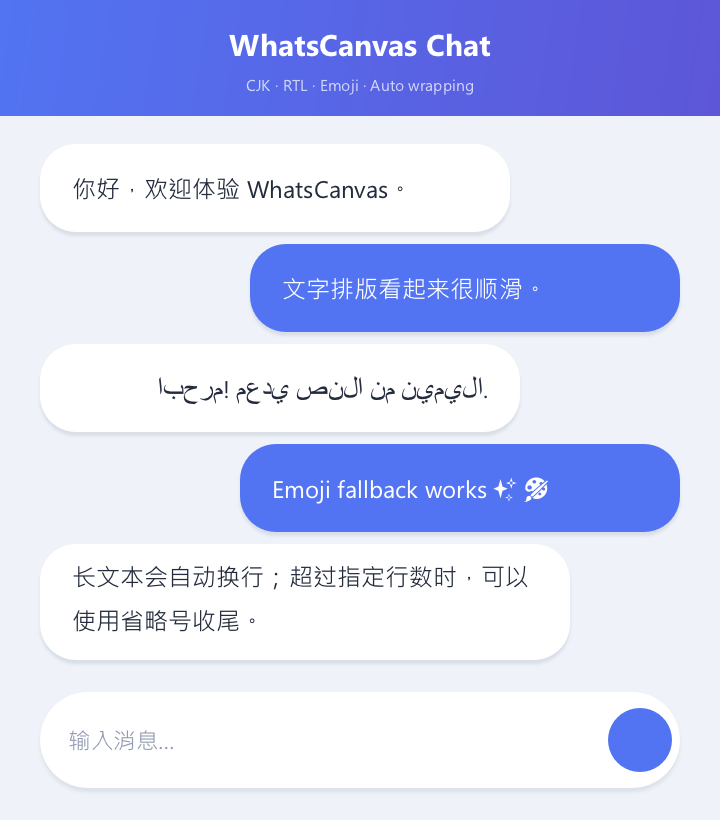
The key point: the example outputs 720 × 820 physical pixels; with DPR 2 the drawing code uses a 360 × 410 logical coordinate space. Body text uses 16 logical units at weight 400. Chinese uses the system font fallback, Arabic is laid out RTL, and long messages are constrained by drawTextBox. The code below matches the compilable source that produced the picture.
// Chapter 07 comprehensive example: multilingual chat bubbles and wrapping.
#include <wsc/FontSystem.h>
#include <wsc/wsc.h>

int main()
{
    // 1. Output 720x820 physical pixels but use a 360x410 logical layout.
    // DPR only decides how logical units map to physical pixels; no need to scale coordinates manually.
    constexpr int kPhysicalWidth = 720;
    constexpr int kPhysicalHeight = 820;
    constexpr float kDpr = 2.0f;
    constexpr float kLogicalWidth = kPhysicalWidth / kDpr;
    constexpr float kLogicalHeight = kPhysicalHeight / kDpr;

    auto canvas = wsc::Canvas::create(
        wsc::Canvas::Backend::Software, kPhysicalWidth, kPhysicalHeight);
    if (!canvas) return 1;
    canvas->setDevicePixelRatio(kDpr);
    if (!canvas->initializeContext()) return 1;
    for (const auto &face : wsc::FontSystem::defaultSystemFontFaces()) {
        canvas->registerFontFace(face);
    }
    canvas->setFontFallbackChain(wsc::FontSystem::defaultFallbackChain());

    // 2. Draw the chat page background and title bar.
    canvas->beginFrame();
    wsc::Paint background;
    background.setColor(wsc::Color(239, 243, 249, 255));
    canvas->drawRect(wsc::RectF(0, 0, kLogicalWidth, kLogicalHeight), background);

    wsc::Paint header;
    header.setLinearGradient(0, 0, kLogicalWidth, 58,
        wsc::Color(82, 116, 242, 255), wsc::Color(93, 86, 216, 255));
    canvas->drawRect(wsc::RectF(0, 0, kLogicalWidth, 58), header);

    wsc::Paint title;
    title.setColor(wsc::Color(255, 255, 255, 255));
    title.setTextSize(20.0f);
    title.setFontWeight(650);
    title.setTextAlign(wsc::Paint::TextAlign::CENTER);
    title.setTextBaseline(wsc::Paint::TextBaseline::MIDDLE);
    canvas->drawText("WhatsCanvas Chat", kLogicalWidth / 2, 22, title);
    title.setTextSize(10.5f);
    title.setFontWeight(400);
    title.setColor(wsc::Color(235, 239, 255, 210));
    canvas->drawText("CJK · RTL · Emoji · Auto wrapping", kLogicalWidth / 2, 42, title);

    // 3. The bubble helper handles side-of-screen layout, shadow, RTL, and auto wrapping.
    auto drawBubble = [&](const char *text, float y, float width, bool isMe,
                          bool rtl = false, bool multiline = false) {
        const float height = multiline ? 58.0f : 44.0f;
        const float x = isMe ? kLogicalWidth - 20.0f - width : 20.0f;
        const wsc::RectF bounds(x, y, width, height);
        canvas->drawBoxShadow(bounds, 18, 0, 5, 0, 2, wsc::Color(33, 48, 78, 28));
        wsc::Paint bubble;
        bubble.setColor(isMe ? wsc::Color(82, 116, 242, 255) : wsc::Color(255, 255, 255, 255));
        bubble.setAntiAlias(true);
        canvas->drawRoundRect(bounds, 18, bubble);

        wsc::Paint textPaint;
        textPaint.setColor(isMe ? wsc::Color(255, 255, 255, 255) : wsc::Color(35, 43, 60, 255));
        // 16 logical units rasterize to about 32 physical pixels at DPR=2.
        // Explicitly use the body Regular weight; do not fake a small size with bold weight.
        textPaint.setTextSize(16.0f);
        textPaint.setFontWeight(400);
        textPaint.setTextBaseline(wsc::Paint::TextBaseline::MIDDLE);
        textPaint.setTextLocale(rtl ? "ar" : "zh-CN");
        if (rtl) {
            textPaint.setTextAlign(wsc::Paint::TextAlign::RIGHT);
            canvas->drawText(text, x + width - 16, y + height / 2, textPaint);
        } else if (multiline) {
            textPaint.setTextBaseline(wsc::Paint::TextBaseline::TOP);
            canvas->drawTextBox(text, wsc::RectF(x + 16, y + 8, width - 32, height - 12),
                                22.0f, 2, true, textPaint);
        } else {
            canvas->drawText(text, x + 16, y + height / 2, textPaint);
        }
    };

    // 4. Use Chinese, Arabic, and emoji to verify font fallback and shaping.
    drawBubble(u8"你好,欢迎体验 WhatsCanvas。", 72, 235, false);
    drawBubble(u8"文字排版看起来很顺滑。", 122, 215, true);
    drawBubble(u8"مرحبا! يدعم النص من اليمين.", 172, 240, false, true);
    drawBubble(u8"Emoji fallback works ✨ 🎨", 222, 220, true);
    drawBubble(u8"Long text wraps automatically; beyond the max line count it ends with an ellipsis.",
               272, 265, false, false, true);

    // 5. Draw the bottom input field and send button.
    const wsc::RectF input(20, 346, 320, 48);
    canvas->drawBoxShadow(input, 24, 0, 6, 0, 2, wsc::Color(33, 48, 78, 24));
    wsc::Paint inputPaint;
    inputPaint.setColor(wsc::Color(255, 255, 255, 255));
    inputPaint.setAntiAlias(true);
    canvas->drawRoundRect(input, 24, inputPaint);
    wsc::Paint placeholder;
    placeholder.setColor(wsc::Color(145, 155, 177, 255));
    placeholder.setTextSize(15.0f);
    placeholder.setFontWeight(400);
    placeholder.setTextBaseline(wsc::Paint::TextBaseline::MIDDLE);
    canvas->drawText(u8"Type a message…", 34, 370, placeholder);
    inputPaint.setColor(wsc::Color(82, 116, 242, 255));
    canvas->drawCircle(320, 370, 16, inputPaint);

    // 6. Submit and save the multilingual chat picture.
    canvas->endFrame();
    return canvas->savePixelsPPM("chapter07_chat.ppm") ? 0 : 2;
}
7.13 Summary
This chapter covered:
- [x] Font registration (file / memory / system discovery)
- [x] Fallback chain configuration
- [x] Native platform text backends (DirectWrite / CoreText)
- [x] Single-line text and alignment
- [x] Font style (weight / slant / spacing / features)
- [x] Text measurement (width / metrics / bounds)
- [x] Multi-line text and ellipsis
- [x] Text effects (outline / gradient / shadow)
- [x] Text on path
- [x] CJK and RTL multilingual layout
Next chapter: Layer Filters and Effects — advanced visual effects: blur, inner shadow, frosted glass.