Chapter 4: Path and Curves
Goal of this chapter: master
wsc::Path, learn to construct complex geometry and Bezier curves, and use path queries, transforms, and hit-testing.
For the Chinese version, see zh/04-path-bindcurves.md.
4.1 What Is a Path?
Path is a 2D geometry description built from one or more subpaths (contours). Each subpath is a sequence of "commands":
A Path carries no color or width information — it only describes shape. To draw one, you pair it with a Paint.
4.2 Basic Path Construction
Triangle
wsc::Path triangle;
triangle.moveTo(200, 50);    // Move to the starting point
triangle.lineTo(350, 300);   // Line to the second point
triangle.lineTo(50, 300);    // Line to the third point
triangle.close();             // Close the path (back to the start)

wsc::Paint paint;
paint.setColor(wsc::Color(255, 87, 34, 255));
paint.setAntiAlias(true);
canvas->drawPath(triangle, paint);
Star
wsc::Path star;
float cx = 200, cy = 200, outerR = 100, innerR = 45;
int points = 5;

for (int i = 0; i < points * 2; ++i) {
    float angle = i * 3.14159265f / points - 3.14159265f / 2;
    float r = (i % 2 == 0) ? outerR : innerR;
    float x = cx + r * std::cos(angle);
    float y = cy + r * std::sin(angle);

    if (i == 0) star.moveTo(x, y);
    else        star.lineTo(x, y);
}
star.close();

wsc::Paint starPaint;
starPaint.setColor(wsc::Color(255, 193, 7, 255));
starPaint.setAntiAlias(true);
canvas->drawPath(star, starPaint);
4.3 Curve Commands
Quadratic Bezier (quadTo)
A curve defined by one control point and one end point:
wsc::Path curve;
curve.moveTo(50, 200);
curve.quadTo(
    200, 50,    // Control point: determines how the curve bends
    350, 200    // End point
);

wsc::Paint paint;
paint.setStyle(wsc::Paint::Style::STROKE);
paint.setStrokeWidth(3.0f);
paint.setAntiAlias(true);
paint.setColor(wsc::Color(33, 150, 243, 255));
canvas->drawPath(curve, paint);
Cubic Bezier (cubicTo)
Two control points plus an end point — enough to express more complex curves:
wsc::Path cubic;
cubic.moveTo(50, 200);
cubic.cubicTo(
    100, 50,    // Control point 1
    300, 350,   // Control point 2
    350, 200    // End point
);

wsc::Paint paint;
paint.setStyle(wsc::Paint::Style::STROKE);
paint.setStrokeWidth(3.0f);
paint.setAntiAlias(true);
paint.setColor(wsc::Color(156, 39, 176, 255));
canvas->drawPath(cubic, paint);
Continuous Curves
You can chain curve commands; each command's end point becomes the next command's start point:
wsc::Path wave;
wave.moveTo(0, 200);
wave.cubicTo(100, 100, 150, 300, 200, 200);
wave.cubicTo(250, 100, 300, 300, 400, 200);

wsc::Paint wavePaint;
wavePaint.setStyle(wsc::Paint::Style::STROKE);
wavePaint.setStrokeWidth(4.0f);
wavePaint.setAntiAlias(true);
wavePaint.setColor(wsc::Color(0, 150, 136, 255));
canvas->drawPath(wave, wavePaint);
4.4 Shape Helpers
Path exposes convenient helpers for common shapes, so you do not have to compute coordinates by hand:
wsc::Path shapes;

// Add a rectangle
shapes.addRect(wsc::RectF(20, 20, 100, 60));

// Add a rounded rectangle
shapes.addRoundRect(wsc::RectF(20, 100, 100, 60), 12.0f);

// Per-corner radii
shapes.addRoundRect(wsc::RectF(20, 180, 100, 60),
    20.0f, 0.0f, 20.0f, 0.0f);  // tl, tr, br, bl

// Add a circle
shapes.addCircle(200, 50, 40);

// Add an oval
shapes.addOval(wsc::RectF(160, 100, 100, 60));
4.5 Fill Rules
The fill rule of a Path determines which enclosed regions count as "inside":
wsc::Path donut;
donut.setFillType(wsc::Path::FillType::EVEN_ODD);

// Outer ring
donut.addCircle(200, 200, 100);
// Inner ring (creates the hollow effect)
donut.addCircle(200, 200, 50);

wsc::Paint paint;
paint.setColor(wsc::Color(233, 30, 99, 255));
paint.setAntiAlias(true);
canvas->drawPath(donut, paint);
| Fill Rule | Effect |
|---|---|
WINDING (default) |
Inside/outside decided by winding number; same-direction contours add up |
EVEN_ODD |
Regions crossed an odd number of times count as inside (common for holes) |
4.6 Path Queries
Bounds
wsc::Path path;
path.addCircle(150, 150, 80);

// Axis-aligned bounds of the filled region
wsc::RectF bounds = path.getBounds();
// bounds ≈ (70, 70, 160, 160)

// Bounds after stroking
wsc::RectF strokeBounds = path.getStrokeBounds(4.0f);
Path Length and Sampling
wsc::Path arc;
arc.moveTo(50, 200);
arc.cubicTo(100, 50, 300, 50, 350, 200);

// Total path length
float len = arc.length();

// Point at a given distance along the path
wsc::PointF point;
arc.pointAtLength(len * 0.5f, point);  // Midpoint

// Point plus tangent direction
wsc::PointF tangent;
arc.pointAndTangentAtLength(len * 0.5f, point, tangent);
Path State
path.isEmpty();            // Has no commands?
path.isClosed();           // Are all subpaths closed?
path.getContourCount();    // Subpath count
4.7 Hit-Testing
Test whether a point lies inside a path's fill region (or inside the stroke region). Useful for interactive event handling:
wsc::Path button;
button.addRoundRect(wsc::RectF(100, 100, 200, 60), 12.0f);

// Is the click inside the fill region?
float clickX = 150, clickY = 130;
bool hit = button.contains(clickX, clickY);  // true

// Is the click inside the stroke region? (for line selection)
bool strokeHit = button.strokeContains(clickX, clickY, 4.0f);
4.8 Path Transforms
Translate
wsc::Path path;
path.addCircle(0, 0, 50);

// Translate the whole path
path.offset(200, 200);  // Center now at (200, 200)
Trim
Take a slice of a path:
wsc::Path fullPath;
fullPath.moveTo(50, 200);
fullPath.cubicTo(100, 50, 300, 50, 350, 200);

// Slice from 30% to 70%
wsc::Path trimmed = fullPath.trim(
    fullPath.length() * 0.3f,
    fullPath.length() * 0.7f
);

canvas->drawPath(trimmed, paint);
Reverse
// Reverse the path direction (affects fill rule and text direction)
wsc::Path reversed = path.reversed();
Corner Rounding
Turn sharp corners into rounded ones:
wsc::Path sharp;
sharp.moveTo(50, 300);
sharp.lineTo(200, 50);
sharp.lineTo(350, 300);
sharp.close();

// Replace sharp corners with a 20-radius arc
wsc::Path rounded = sharp.roundedCorners(20.0f);
canvas->drawPath(rounded, paint);
4.9 Path Stroke Effects
Dashed Path
wsc::Paint dashStroke;
dashStroke.setStyle(wsc::Paint::Style::STROKE);
dashStroke.setStrokeWidth(3.0f);
dashStroke.setAntiAlias(true);
dashStroke.setColor(wsc::Color(33, 33, 33, 255));
dashStroke.setDashPathEffect({15.0f, 8.0f}, 0.0f);

wsc::Path circle;
circle.addCircle(200, 200, 100);
canvas->drawPath(circle, dashStroke);
Animated Dashes (via phase)
Changing phase creates a marching-ants animation:
float phase = frameCount * 2.0f;  // Increment each frame
dashStroke.setDashPathEffect({15.0f, 8.0f}, phase);
4.10 Integrated Example: A Gauge
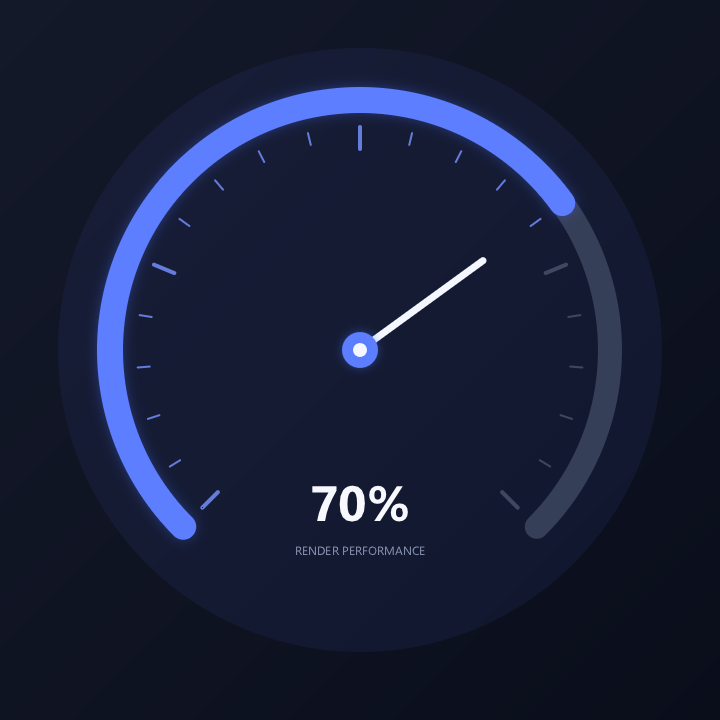
The key point: background arc, progress arc, tick marks, and needle are drawn separately; the text region is kept apart from the needle region to avoid label overlap. The code below matches the compilable source that produced the picture.
// Chapter 04 comprehensive example: a readable gauge built with paths and arcs.
#include <wsc/FontSystem.h>
#include <wsc/wsc.h>

#include <cmath>

int main()
{
    // 1. Create the canvas and prepare text rendering.
    auto canvas = wsc::Canvas::create(wsc::Canvas::Backend::Software, 720, 720);
    if (!canvas || !canvas->initializeContext()) return 1;
    for (const auto &face : wsc::FontSystem::defaultSystemFontFaces()) canvas->registerFontFace(face);
    canvas->setFontFallbackChain(wsc::FontSystem::defaultFallbackChain());

    constexpr float pi = 3.14159265f, cx = 360.0f, cy = 350.0f, radius = 250.0f;
    constexpr float progress = 0.70f, start = pi * 0.75f, sweep = pi * 1.5f;

    // 2. Draw a dark background and a soft halo around the dial.
    canvas->beginFrame();

    wsc::Paint background;
    background.setLinearGradient(0, 0, 720, 720,
        wsc::Color(20, 25, 42, 255), wsc::Color(10, 14, 27, 255));
    canvas->drawRect(wsc::RectF(0, 0, 720, 720), background);

    wsc::Paint halo;
    halo.setColor(wsc::Color(82, 113, 255, 18));
    halo.setAntiAlias(true);
    canvas->drawCircle(cx, cy, radius + 52, halo);

    // 3. Divide the 270-degree range into 20 segments, with a long tick every fifth.
    wsc::Paint tick;
    tick.setStyle(wsc::Paint::Style::STROKE);
    tick.setStrokeCap(wsc::Paint::StrokeCap::ROUND);
    tick.setAntiAlias(true);
    for (int i = 0; i <= 20; ++i) {
        const float t = static_cast<float>(i) / 20.0f;
        const float angle = start + sweep * t;
        const float outer = radius - 27;
        const float inner = outer - (i % 5 == 0 ? 22.0f : 12.0f);
        tick.setStrokeWidth(i % 5 == 0 ? 4.0f : 2.0f);
        tick.setColor(i <= 14 ? wsc::Color(117, 145, 255, 210) : wsc::Color(82, 91, 116, 180));
        canvas->drawLine(cx + std::cos(angle) * inner, cy + std::sin(angle) * inner,
                         cx + std::cos(angle) * outer, cy + std::sin(angle) * outer, tick);
    }

    // 4. Draw the full track first, then overlay the progress arc up to `progress`.
    const wsc::RectF arcBounds(cx - radius, cy - radius, radius * 2, radius * 2);
    wsc::Paint track;
    track.setStyle(wsc::Paint::Style::STROKE);
    track.setStrokeWidth(24.0f);
    track.setStrokeCap(wsc::Paint::StrokeCap::ROUND);
    track.setColor(wsc::Color(54, 63, 88, 255));
    track.setAntiAlias(true);
    canvas->drawArc(arcBounds, start, sweep, wsc::Canvas::ArcMode::OPEN, track);

    wsc::Paint valueArc = track;
    valueArc.setStrokeWidth(26.0f);
    valueArc.setColor(wsc::Color(92, 126, 255, 255));
    valueArc.setShadowLayer(18, 0, 0, wsc::Color(74, 111, 255, 90));
    canvas->drawArc(arcBounds, start, sweep * progress, wsc::Canvas::ArcMode::OPEN, valueArc);

    // 5. The needle uses the same angle formula as the progress arc for perfect alignment.
    const float angle = start + sweep * progress;
    wsc::Paint needle;
    needle.setStyle(wsc::Paint::Style::STROKE);
    needle.setStrokeWidth(7.0f);
    needle.setStrokeCap(wsc::Paint::StrokeCap::ROUND);
    needle.setColor(wsc::Color(244, 247, 255, 255));
    needle.setAntiAlias(true);
    canvas->drawLine(cx, cy, cx + std::cos(angle) * 152, cy + std::sin(angle) * 152, needle);

    wsc::Paint hub;
    hub.setColor(wsc::Color(92, 126, 255, 255));
    hub.setAntiAlias(true);
    hub.setShadowLayer(14, 0, 0, wsc::Color(74, 111, 255, 110));
    canvas->drawCircle(cx, cy, 18, hub);
    hub.setColor(wsc::Color(244, 247, 255, 255));
    canvas->drawCircle(cx, cy, 7, hub);

    // 6. The value and the label use separate vertical positions to avoid overlap.
    wsc::Paint value;
    value.setColor(wsc::Color(247, 249, 255, 255));
    value.setTextSize(66.0f);
    value.setFontWeight(650);
    value.setTextAlign(wsc::Paint::TextAlign::CENTER);
    value.setTextBaseline(wsc::Paint::TextBaseline::MIDDLE);
    canvas->drawText("70%", cx, 500, value);
    wsc::Paint label = value;
    label.setColor(wsc::Color(139, 151, 181, 255));
    label.setTextSize(16.0f);
    label.setFontWeight(500);
    canvas->drawText("RENDER PERFORMANCE", cx, 550, label);

    // 7. Write out the gauge image used in the tutorial.
    canvas->endFrame();
    return canvas->savePixelsPPM("chapter04_gauge.ppm") ? 0 : 2;
}
4.11 API Cheat Sheet
| Method | Description |
|---|---|
moveTo(x, y) |
Move the pen (start a new subpath) |
lineTo(x, y) |
Line to the target point |
quadTo(cx, cy, ex, ey) |
Quadratic Bezier curve |
cubicTo(c1x, c1y, c2x, c2y, ex, ey) |
Cubic Bezier curve |
close() |
Close the current subpath |
reset() |
Clear all commands |
addRect / addRoundRect / addCircle / addOval |
Add primitive shapes |
contains(x, y) |
Hit-test the fill region |
strokeContains(x, y, width) |
Hit-test the stroke region |
getBounds() |
Bounding box |
length() |
Total path length |
pointAtLength(dist, &pt) |
Sample a point on the path |
trim(start, end) |
Take a sub-slice |
reversed() |
Reverse the direction |
roundedCorners(r) |
Round sharp corners |
offset(dx, dy) |
Translate |
4.12 Summary
This chapter covered:
- [x] Path construction (moveTo / lineTo / close)
- [x] Quadratic and cubic Bezier curves
- [x] Shape helpers (addRect / addCircle, ...)
- [x] Fill rules (WINDING vs EVEN_ODD)
- [x] Path queries (bounds / length / sampling)
- [x] Hit-testing
- [x] Path transforms (offset / trim / reversed / roundedCorners)
- [x] Dashed strokes and marching-ants animation
Next chapter: State Stack and Transforms — learn the save/restore state stack, coordinate transforms, and clipping.