Visual API Gallery
See the rendered result before writing integration code. Every image on this page is captured from a real WhatsCanvas example; none is a design mockup or an SVG reconstruction.
| What you want to build | Main API | Jump to the result |
|---|---|---|
| Smooth shapes and strokes | setAntiAlias, drawPath, drawCircle |
Anti-aliasing |
| Gradient-filled geometry | setLinearGradient, setRadialGradient |
Gradients |
| Soft elevation and glow | setShadowLayer |
Gaussian shadows |
| Rounded and arbitrary masks | clipPath |
Clipping and composed geometry |
| Multilingual, wrapped, styled text | drawText, drawTextBox, drawTextOnPath |
Text and fonts |
| Frosted glass and pixel effects | saveLayer, ImageFilter, LayerOptions |
Image filters and frosted glass |
How to read the snippets
The snippets show the API call that produces the visible effect. They assume
an initialized canvas between beginFrame() and endFrame(). The
integration guide covers creation, backend
setup, frame lifecycle, linking, and presentation.
Composed geometry
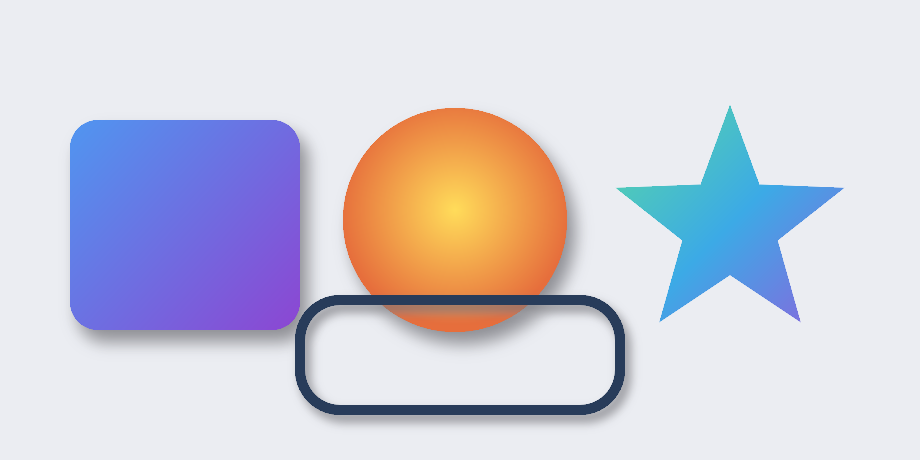
This single OpenGL capture combines four common drawing operations:
| Visible object | API responsible for it |
|---|---|
| Purple rounded rectangle | drawRoundRect + setLinearGradient + setShadowLayer |
| Orange circle | drawCircle + setRadialGradient + setShadowLayer |
| Blue/green star | clipPath over a multi-stop gradient |
| Dark outlined capsule | stroke style + anti-aliasing + Gaussian shadow |
wsc::Paint card;
card.setAntiAlias(true);
card.setLinearGradient(
    70.0f, 120.0f, 300.0f, 330.0f,
    {wsc::Paint::ColorStop(0.0f, wsc::Color(80, 150, 240)),
     wsc::Paint::ColorStop(1.0f, wsc::Color(140, 70, 210))});
card.setShadowLayer(22.0f, 8.0f, 12.0f, wsc::Color(20, 20, 30, 150));

canvas->drawRoundRect(wsc::RectF(70, 120, 230, 210), 28.0f, card);
The capture is generated by
examples/aa_showcase
with MSAA disabled, so the edges shown here come from WhatsCanvas itself.
Anti-aliasing
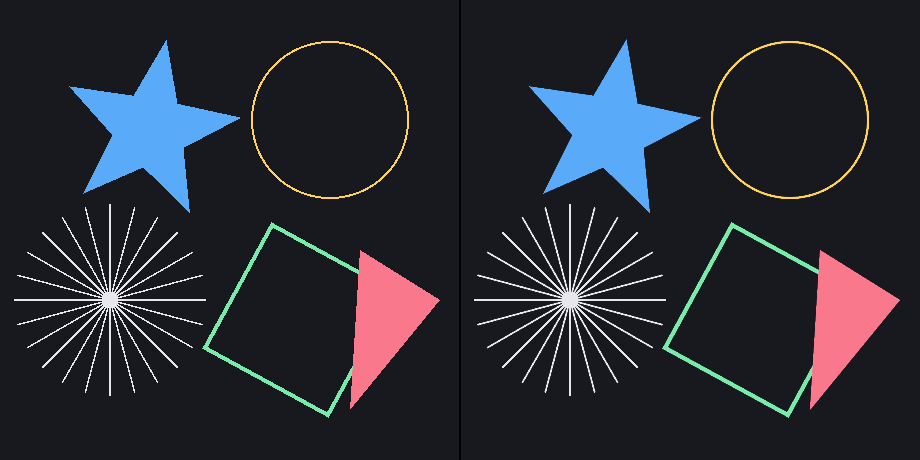
Left: setAntiAlias(false). Right: setAntiAlias(true). The scene uses
the same star, hairlines, circle, rotated rectangle, and triangle on both sides.
wsc::Paint shape;
shape.setStyle(wsc::Paint::Style::FILL);
shape.setColor(wsc::Color(90, 170, 250));
shape.setAntiAlias(true);
canvas->drawPath(starPath, shape);

wsc::Paint hairline;
hairline.setStyle(wsc::Paint::Style::STROKE);
hairline.setStrokeWidth(1.5f);
hairline.setStrokeCap(wsc::Paint::StrokeCap::ROUND);
hairline.setColor(wsc::Color(230, 230, 235));
hairline.setAntiAlias(true);
canvas->drawLine(x0, y0, x1, y1, hairline);
Anti-aliasing applies to filled paths, strokes, transformed geometry, circles, rounded rectangles, and arbitrary path edges. It does not require framebuffer MSAA.
Gradients
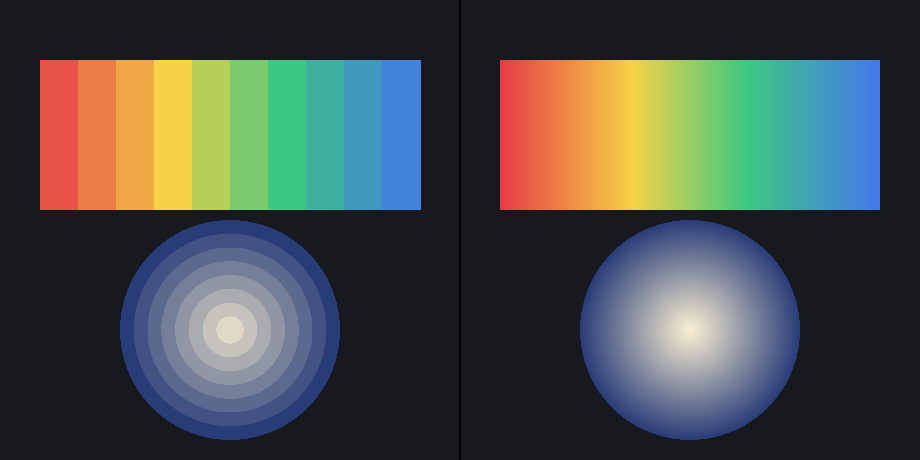
Left: coarse flat-color bands. Right: WhatsCanvas fragment-level linear and radial gradients using the APIs below.
wsc::Paint linear;
linear.setLinearGradient(
    40.0f, 60.0f, 420.0f, 60.0f,
    {wsc::Paint::ColorStop(0.00f, wsc::Color(230, 60, 70)),
     wsc::Paint::ColorStop(0.35f, wsc::Color(245, 210, 70)),
     wsc::Paint::ColorStop(0.65f, wsc::Color(60, 200, 130)),
     wsc::Paint::ColorStop(1.00f, wsc::Color(70, 120, 235))});
canvas->drawRect(wsc::RectF(40, 60, 380, 150), linear);

wsc::Paint radial;
radial.setRadialGradient(
    230.0f, 330.0f, 110.0f,
    wsc::Color(250, 240, 210), wsc::Color(40, 60, 120));
canvas->drawCircle(230.0f, 330.0f, 110.0f, radial);
Gradient paints can be reused with rectangles, paths, circles, strokes, and
text. Multi-stop gradients and clamp, repeat, and mirror tile modes are
available through Paint.
Gaussian shadows
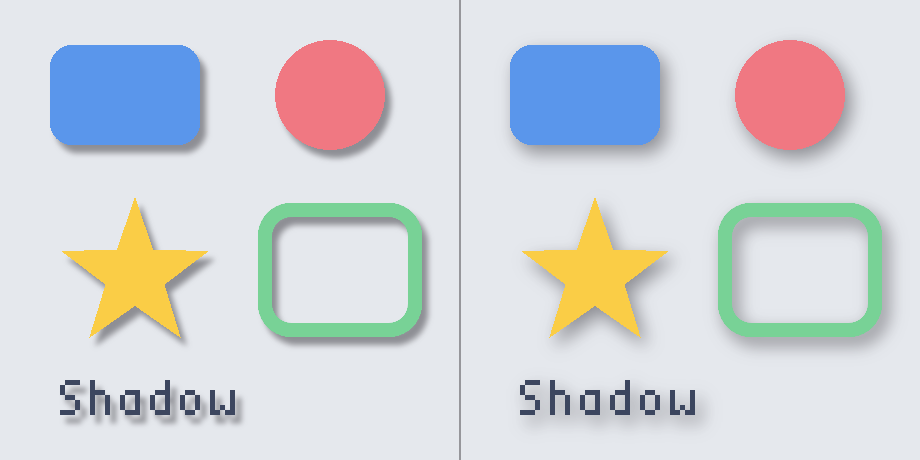
Both panels use true separable-Gaussian shadows. Left: radius 8.
Right: radius 24. The effect follows filled geometry, stroked outlines,
concave paths, and glyph silhouettes.
wsc::Paint elevated;
elevated.setColor(wsc::Color(90, 150, 235));
elevated.setShadowLayer(
    24.0f,                 // blur radius
    6.0f, 8.0f,            // x/y offset
    wsc::Color(20, 20, 30, 150));

canvas->drawRoundRect(wsc::RectF(50, 45, 150, 100), 22.0f, elevated);
Use drawBoxShadow for CSS-like outer/inner box shadows when the source is a
rounded rectangle. Use setShadowLayer when the shadow should follow the
actual path, stroke, or text shape.
Clipping and composed geometry
The star in the composed image is not a pre-made bitmap. A gradient rectangle is drawn through an arbitrary path clip:
canvas->save();

wsc::Path star;
star.moveTo(730, 105);
// Add the remaining points, then close the contour.
star.close();
canvas->clipPath(star);

wsc::Paint gradient;
gradient.setAntiAlias(true);
gradient.setLinearGradient(
    610, 105, 850, 345,
    {wsc::Paint::ColorStop(0.0f, wsc::Color(90, 220, 160)),
     wsc::Paint::ColorStop(0.5f, wsc::Color(60, 170, 230)),
     wsc::Paint::ColorStop(1.0f, wsc::Color(150, 90, 220))});
canvas->drawRect(wsc::RectF(600, 95, 260, 260), gradient);

canvas->restore();
save() and restore() scope both transforms and clips. Multiple clipPath
calls intersect, so complex masks do not require a separate image asset.
Text and fonts
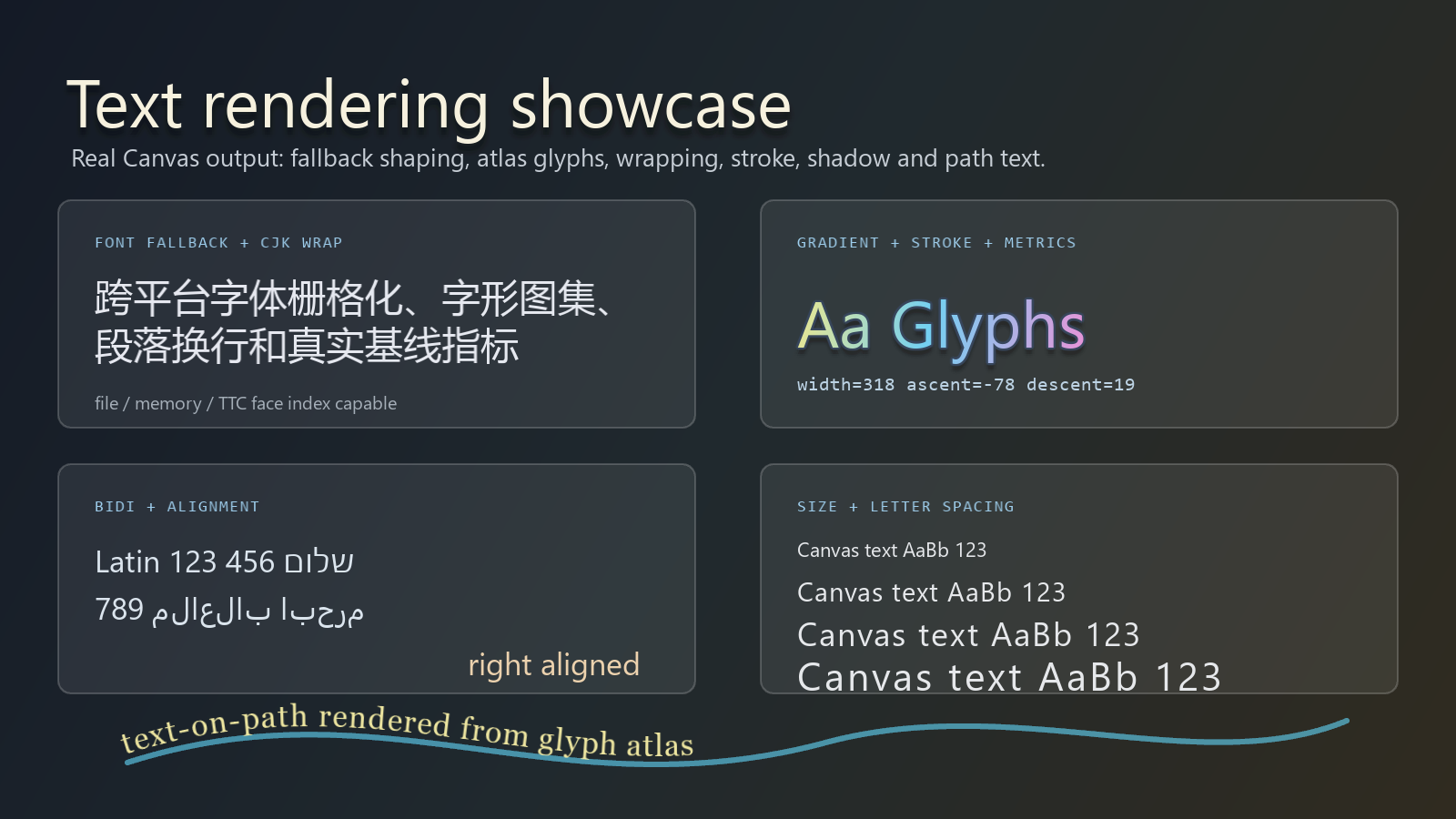
This 1600 x 900 image is real Canvas output from
examples/showcase.
It demonstrates several text APIs in one frame:
| Region | Capability and API |
|---|---|
| Top left | Font fallback, CJK glyphs, drawTextBox, wrapping |
| Top right | Gradient glyph fill, stroke, shadow, measureText |
| Bottom left | Unicode bidirectional layout and alignment |
| Bottom right | Text size and setLetterSpacing |
| Curved baseline | Glyph-atlas drawTextOnPath |
canvas->registerFontFace(wsc::FontFace::fromFile(
    wsc::FontDescriptor("Inter"), "assets/fonts/Inter-Regular.ttf"));
canvas->registerFontFace(wsc::FontFace::fromFile(
    wsc::FontDescriptor("Noto Sans CJK"),
    "assets/fonts/NotoSansCJK-Regular.ttc", 0));

wsc::FontFallbackChain fallback("Inter");
fallback.addFallbackFamily("Noto Sans CJK");
canvas->setFontFallbackChain(fallback);

wsc::Paint text;
text.setFontFamily("Inter");
text.setTextSize(28.0f);
text.setLetterSpacing(0.5f);
text.setColor(wsc::Color(230, 235, 245));

canvas->drawTextBox(
    "Multilingual text wraps using glyph metrics.",
    wsc::RectF(40, 40, 560, 140),
    36.0f, 3, true, text);
canvas->drawTextOnPath("text-on-path", wavePath, 0.0f, -18.0f, text);
The text pipeline supports system font discovery, file/memory/TTC font faces, family fallback, glyph atlases, FreeType rasterization, optional HarfBuzz OpenType shaping, Unicode bidirectional layout, measurement, alignment, baseline selection, wrapping, ellipsis, fill/stroke/gradient/shadow styling, and path text. See Text & Fonts for the detailed feature and backend matrix.
Image filters and frosted glass
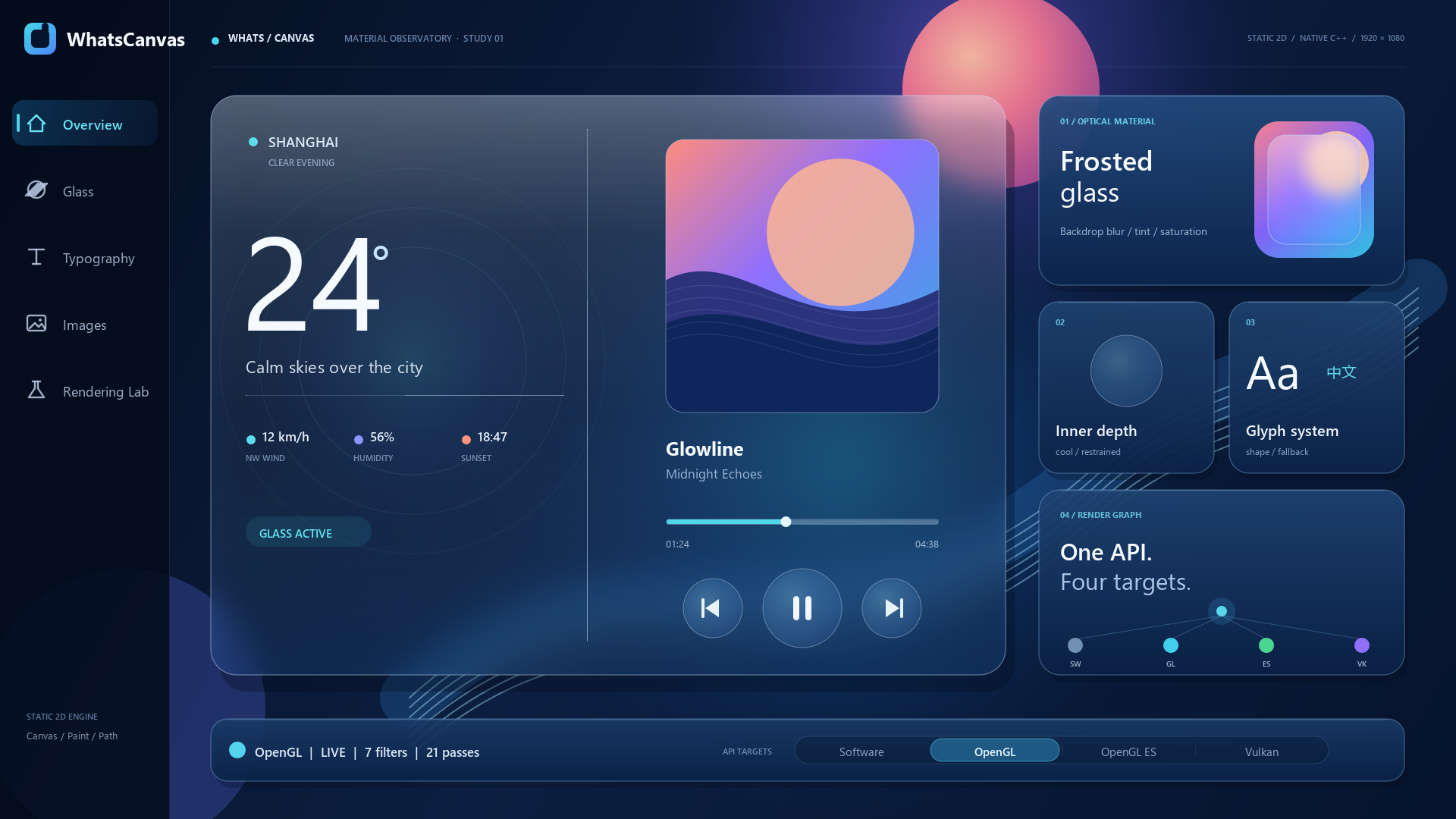
This 1920 x 1080 OpenGL capture is produced by
examples/image_filter_showcase.
The colorful background and every glass panel are drawn by WhatsCanvas. The
panels use a rounded path clip, backdrop blur, color adjustment, grain,
gradient tint, border, and sharp foreground text.
canvas->save();

wsc::Path panel;
panel.addRoundRect(panelBounds, 32.0f);
canvas->clipPath(panel);

wsc::LayerOptions glass;
glass.setBackdropFilter(wsc::ImageFilter::frostedGlass(
    18.0f,  // blur sigma
    1.08f,  // saturation
    1.03f,  // brightness
    1.00f,  // contrast
    0.004f  // grain
));

wsc::Paint composite;
composite.setColor(wsc::Color::WHITE);
canvas->saveLayer(panelBounds, composite, glass);
canvas->restore(); // composites the filtered backdrop

wsc::Paint tint;
tint.setColor(wsc::Color(255, 255, 255, 28));
canvas->drawPath(panel, tint);
canvas->drawText("Sharp foreground", x, y, textPaint);

canvas->restore(); // releases the rounded clip
The same layer model also provides content blur, inner shadows, ordered color matrices, offsets, and filter chains. Software, OpenGL, OpenGL ES, and Vulkan share the public API and are covered by pixel-parity tests. See Image Filters & Frosted Glass for semantics and backend details.
Backend expectations
The images above are reference captures, not a promise of byte-identical output from every graphics driver. WhatsCanvas validates the same scenes across its backends with bounded pixel-error tests.
| Capability shown here | Software | OpenGL | OpenGL ES | Vulkan |
|---|---|---|---|---|
| Geometry, paths, AA, gradients | Yes | Yes | Yes | Yes |
| Shadows and arbitrary clipping | Yes | Yes | Yes | Yes |
| Text shaping, fallback, glyph atlas | Yes | Yes | Yes | Yes |
| Image and backdrop filters | Yes | Yes | Yes | Yes |
Start with the library integration guide, then use the API Reference for complete signatures.