Using WhatsCanvas as a Library¶
A task-oriented guide for developers who want to use WhatsCanvas in their own project. For the full capability catalog see the README; for the exact public symbols see the API Reference.
- Just want to render something right now? → 1. First pixel in 60 seconds (no GPU, window, or context).
- Adding it to a real project? → 3. Add WhatsCanvas to your build.
- Choosing a backend? → 2. Pick a backend.
- Curious about Vulkan? → 4. The Vulkan backend, explained.
- Want to see what each drawing API produces? → Visual API Gallery (real renderer captures, not mockups).
See the result before integrating¶
The gallery pairs common API calls with actual WhatsCanvas output. These are captures generated by the repository examples, so you can judge edge quality, text layout, gradients, shadows, and filters without building the project.
| Drawing area | What the capture demonstrates | Full-size result |
|---|---|---|
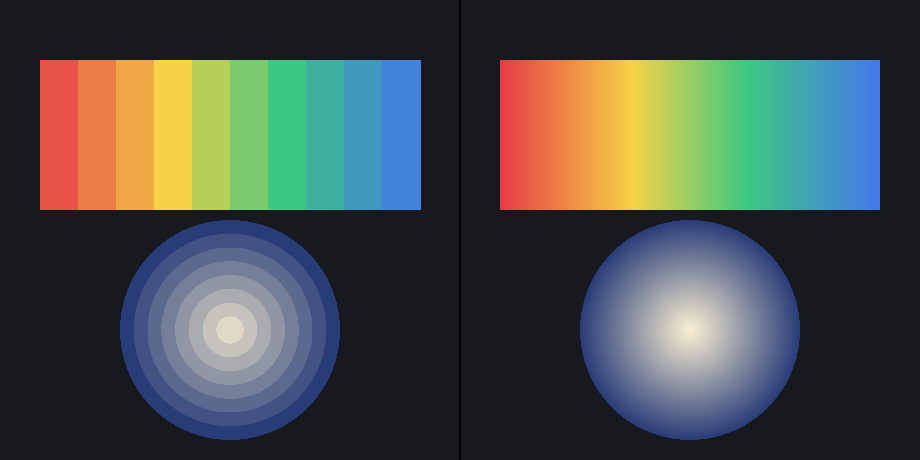
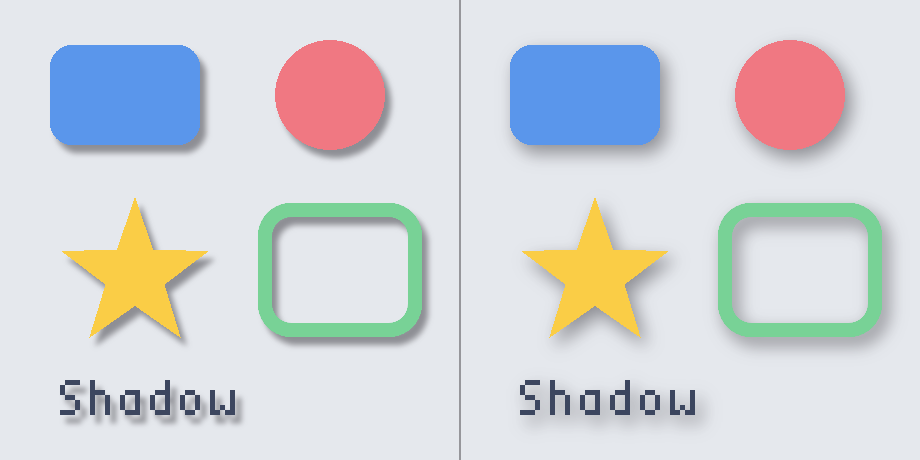
| Shapes and paint | Paths, anti-aliasing, gradients, clipping, Gaussian shadows | Open the geometry gallery |
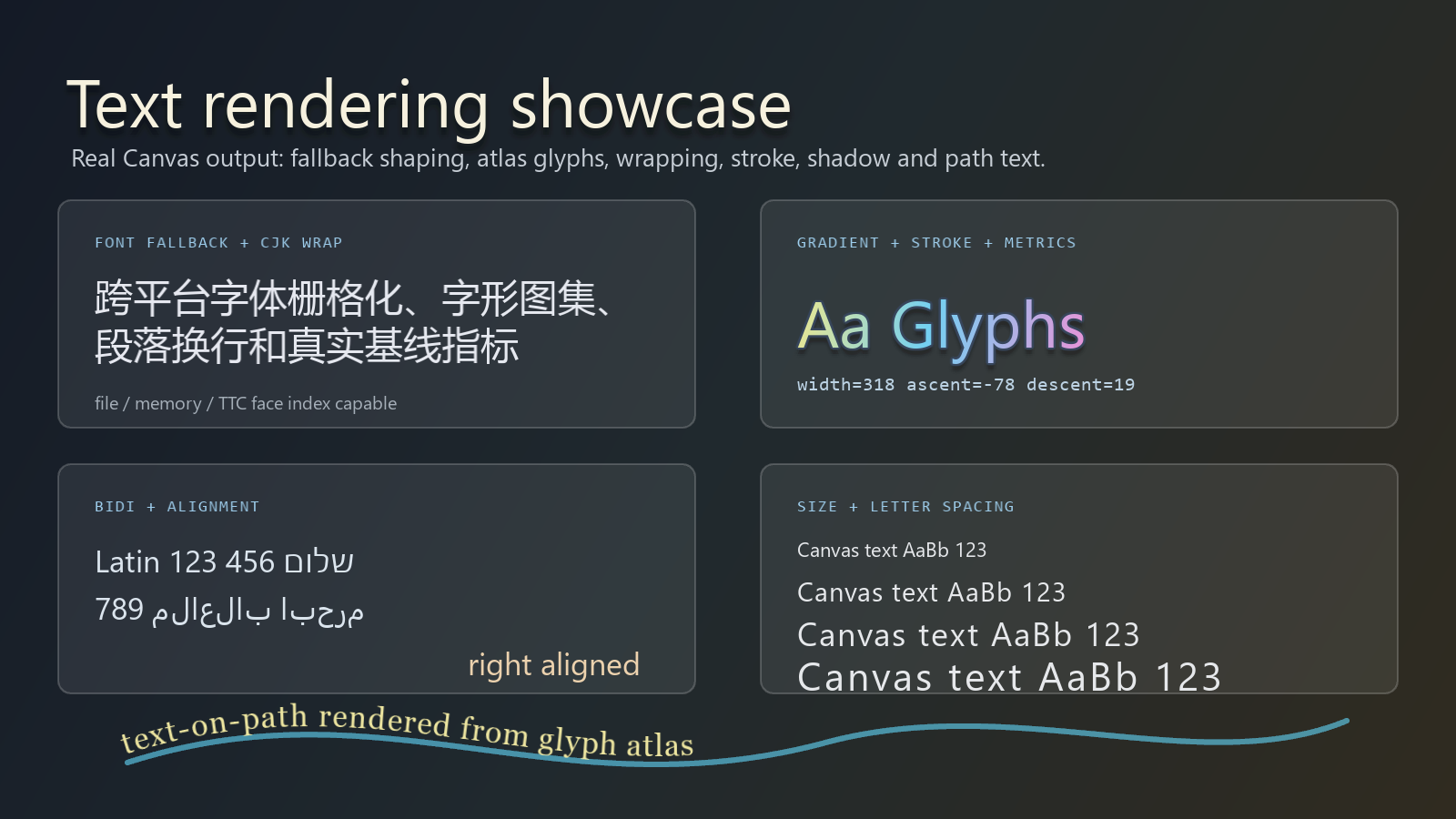
| Text and fonts | Fallback, CJK, bidi, wrapping, gradient/stroke text, path text | Open the text gallery |
| Image filters | Rounded frosted glass, backdrop blur, tint, grain, inner depth | Open the filter gallery |

1. First pixel in 60 seconds¶
The software (CPU) backend is the fastest way to try WhatsCanvas: no OpenGL, no window, no graphics context. It renders into memory and you read the pixels back — ideal for a first test, servers, CI, or thumbnails.
#include <wsc/wsc.h>

int main()
{
    // Sized but not initialized — no GL context or window is needed.
    auto canvas = wsc::Canvas::create(wsc::Canvas::Backend::Software, 256, 256);
    canvas->beginFrame();

    wsc::Paint bg;
    bg.setColor(wsc::Color(18, 20, 24, 255));
    canvas->drawRect(wsc::RectF(0, 0, 256, 256), bg);

    wsc::Paint fill;
    fill.setColor(wsc::Color(40, 120, 240, 255));
    fill.setAntiAlias(true);
    canvas->drawRoundRect(wsc::RectF(40, 40, 176, 176), 24.0f, fill);

    canvas->endFrame();
    canvas->savePixelsPPM("first.ppm"); // open in an image viewer / convert to PNG
    return 0;
}
That is a complete, runnable program. No loadOpenGL, and no explicit
initializeContext is needed: beginFrame() initializes the software backend
lazily.
Canvas::create(...)returns astd::unique_ptr<wsc::Canvas>that is already sized. Use->to call methods. It is not pre-initialized: callbeginFrame()orinitializeContext()before drawing.endFrame()requires an initialized backend.
The frame lifecycle: beginFrame / endFrame¶
Drawing is bracketed by a matching pair. The minimal offscreen flow is exactly four steps:
canvas->beginFrame();                       // initializes lazily; resets queued frame state
canvas->drawRect(/* ... */, paint);         // record draws
canvas->endFrame();                         // render + make readable (pairs with beginFrame)
canvas->readPixelsRGBA(pixels);             // or savePixelsPPM("out.ppm")
endFrame() submits and then consumes the recorded commands. On the normal
output path, Software clears on every submission, Vulkan clears when a non-empty
draw list starts, and OpenGL draws into the current framebuffer without an
implicit clear. A render-target canvas created with OffscreenTexture() rebuilds
its texture only when commands are queued. A GL host that needs a fresh
background must clear it itself. Call endFrame() exactly once per frame,
right before reading back or presenting:
- Do not call
endFrame()twice in a row — there are no commands left on the second call. A normal Software framebuffer clears to transparent; Vulkan, OpenGL, and anOffscreenTexture()render-target canvas retain their existing target contents. - Do not call
beginFrame()after drawing — it discards queued commands and resets the frame state before they are submitted.
One beginFrame, your draws, one endFrame, then read/present.
2. Pick a backend¶
WhatsCanvas separates the Canvas API (what you draw) from the backend
(where it renders). One factory selects the backend:
Canvas::create(Backend, width, height) — returns nullptr if that backend is
unavailable in your build/host. Adding a future backend (for example D3D) needs no
new API, just a new Backend value.
| Backend | Backend value |
Needs a GL context / window? | Use when |
|---|---|---|---|
| Software (CPU) | Backend::Software |
No | Headless, servers, tests, thumbnails, "just works" everywhere |
| OpenGL | Backend::OpenGL |
Yes (you own it) | Desktop apps/games with a window (GLFW, SDL, Qt, your engine) |
| OpenGL ES | Backend::OpenGLES |
Yes (you own it) | Mobile / embedded GLES 3.0 |
| Vulkan (optional) | Backend::Vulkan |
No external GL context; off-screen by default | Vulkan pipelines, off-screen rendering, or Win32 ToWindow; nullptr when unavailable |
| Metal (Apple) | Backend::Metal |
No external GL context; off-screen or CAMetalLayer |
Native macOS/iOS rendering; enabled by default on Apple platforms |
using Backend = wsc::Canvas::Backend;

// Explicit backend (sized; initialize explicitly when you want deterministic
// lifecycle control):
auto canvas = wsc::Canvas::create(Backend::Software, 256, 256);
canvas->initializeContext();

// Or let WhatsCanvas pick the first available from a preference list:
auto best = wsc::Canvas::create(
    {Backend::Vulkan, Backend::Metal, Backend::OpenGL, Backend::Software}, 256, 256);

// Query support / which backend you got:
bool hasVk = wsc::Canvas::isBackendAvailable(Backend::Vulkan);
Backend chosen = best->backend();
Canvas::create(...) is the single entry point for every backend. For the
"I already have a GL context" case, create an OpenGL canvas with size 0, 0 and
set the size yourself: auto c = Canvas::create(Backend::OpenGL, 0, 0);. Backend
selection is a link-time choice (which library target you link) plus this
runtime choice.
OpenGL: you own the window and context¶
WhatsCanvas never creates a window or GL context. Your app (or GLFW/SDL/Qt) creates the context, makes it current, then hands the loader to WhatsCanvas:
#include <wsc/wsc.h>
#include <GLFW/glfw3.h>

int main()
{
    glfwInit();
    GLFWwindow *window = glfwCreateWindow(800, 600, "WhatsCanvas", nullptr, nullptr);
    glfwMakeContextCurrent(window);

    // Hand WhatsCanvas your platform's GL loader.
    wsc::Canvas::loadOpenGL(reinterpret_cast<wsc::Canvas::OpenGLProcAddress>(glfwGetProcAddress));

    auto canvasOwner = wsc::Canvas::create(wsc::Canvas::Backend::OpenGL, 800, 600);
    wsc::Canvas &canvas = *canvasOwner;
    canvas.initializeContext();

    while (!glfwWindowShouldClose(window)) {
        canvas.beginFrame();
        wsc::Paint p;
        p.setColor(wsc::Color(40, 120, 240, 255));
        p.setAntiAlias(true);
        canvas.drawRoundRect(wsc::RectF(80, 80, 320, 180), 16.0f, p);
        canvas.endFrame();

        glfwSwapBuffers(window);
        glfwPollEvents();
    }

    canvas.releaseResources();
    glfwDestroyWindow(window);
    glfwTerminate();
    return 0;
}
The lifecycle contract for the GL/GLES backends:
Canvas::loadOpenGL(loader)once, after a context is current.canvas.setSize(w, h)thencanvas.initializeContext().canvas.beginFrame()→ draw →canvas.endFrame()per frame (with your context current). Clear the host framebuffer explicitly when required.canvas.releaseResources()before tearing down the context. On context loss (e.g. Android background), callreleaseResources()and re-initializeContext().
The Software, Vulkan, and Metal backends need no
loadOpenGL.beginFrame()initializes them lazily; callinitializeContext()explicitly if you want initialization outside the frame loop.
3. Add WhatsCanvas to your build¶
Option A — Use a prebuilt GitHub Release (fastest)¶
Tagged releases publish per-platform prebuilt packages on the repository's Releases page. Asset names follow:
whatscanvas-<os>-release-<version>.zip
# e.g. whatscanvas-win64-release-0.3.0.zip
#      whatscanvas-linux-x64-release-0.3.0.zip
#      whatscanvas-macos-universal-release-0.3.0.zip
- Download the archive for your OS from Releases and unzip it. You get:
include/wsc/— public headerslib/— the library binarieslib/cmake/WhatsCanvas/—find_packageconfig files- Point
CMAKE_PREFIX_PATHat the unzipped folder and consume the target:
cmake_minimum_required(VERSION 3.16)
project(MyApp LANGUAGES CXX)

set(CMAKE_CXX_STANDARD 17)
set(CMAKE_CXX_STANDARD_REQUIRED ON)

find_package(WhatsCanvas 0.3.0 CONFIG REQUIRED)

add_executable(MyApp main.cpp)
target_link_libraries(MyApp PRIVATE WhatsCanvas::OpenGL)   # or ::Software / ::OpenGLES
cmake -S . -B build -DCMAKE_PREFIX_PATH=/path/to/unzipped/whatscanvas
cmake --build build --config Release
The release build matrix is platform-specific. Windows assets are built as shared libraries with OpenGL, OpenGLES, and Vulkan enabled; Linux and macOS assets use the platform defaults. If a required imported target is absent from your platform archive, build from source with the corresponding option (for Vulkan,
-DWHATSCANVAS_ENABLE_VULKAN=ON; see section 4). On Apple platforms Metal is included inWhatsCanvas::OpenGLby default.
Option B — Build the package yourself¶
# Windows
build.bat --release --package --no-run
# macOS / Linux
sh ./build.sh --release --package --no-run
The package lands in out/package/<Config>/ with the same layout as a release
archive; consume it exactly as in Option A (CMAKE_PREFIX_PATH=.../out/package/Release).
A complete, CI-verified minimal consumer lives in
tests/package_consumer.
Option C — add_subdirectory (vendoring the source)¶
Drop the repository into your tree (or a submodule) and:
Which target do I link?¶
| Target | Backend | Extra dependencies |
|---|---|---|
WhatsCanvas::Software |
CPU only | none (no OpenGL/Vulkan/Metal) |
WhatsCanvas::OpenGL |
Desktop GL (+ optional Vulkan and Apple Metal, see §4) | system OpenGL; Apple frameworks when Metal is enabled |
WhatsCanvas::OpenGLES |
GLES 3.0 | system GLES |
Software-only (no GPU dependency)¶
To produce a binary that links no graphics libraries at all:
Right for headless services, CI containers, and platforms without a GPU/driver stack.
4. The Vulkan backend, explained¶
Vulkan is a manual, opt-in backend. Here is exactly how it exists and behaves:
Opt-in, not automatic. It is off by default. You enable it at configure time with a Vulkan SDK present:
If the flag is off, there is no Vulkan code path. If the flag is on but no SDK is
found, it compiles as an inert stub (so the build still succeeds), and
Canvas::isBackendAvailable(Canvas::Backend::Vulkan) returns false.
It coexists with OpenGL — it is not "either/or". Vulkan is not a separate
library; its code is compiled into the same WhatsCanvas::OpenGL target. When
enabled, one library contains both the OpenGL and Vulkan backends, and you
choose between them at runtime:
using Backend = wsc::Canvas::Backend;
auto gl = wsc::Canvas::create(Backend::OpenGL, 0, 0);   // OpenGL: loadOpenGL(...) + initializeContext()
auto vk = wsc::Canvas::create(Backend::Vulkan, w, h);   // Vulkan: off-screen
Always guard the Vulkan path so it degrades gracefully:
using Backend = wsc::Canvas::Backend;
auto canvas = wsc::Canvas::isBackendAvailable(Backend::Vulkan)
                  ? wsc::Canvas::create(Backend::Vulkan, 512, 512)   // may still return nullptr
                  : wsc::Canvas::create(Backend::Software, 512, 512); // fallback
// ... render, then canvas->readPixelsRGBA(...)
Why is Vulkan usually used off-screen (unlike OpenGL)? The Canvas Vulkan
device is headless by default, while Win32 window presentation is an explicit
OutputTarget::ToWindow(...) path. The difference is about who owns the
presentation surface:
- The OpenGL backend renders into the framebuffer of the GL context you create and make current — so it can draw straight to your window.
- The Vulkan backend renders into an off-screen image by default, which you
can read with
readPixelsRGBAor use as a texture. On Win32, the Canvas API can also build a surface/swapchain throughOutputTarget::ToWindow(...)and deliver frames withpresent(); seeexamples/vulkan_canvas_present. Other native surface types remain future work.
Why does the pipeline differ from OpenGL at all? The OpenGL backend is driven by immediate GL calls issued per command against the current context. The Vulkan backend instead encodes the same drawing into a backend-neutral draw list and submits it through the device with its own command buffers and queues. Same Canvas API and same visual result — different plumbing underneath.
The Metal backend, in short¶
On macOS and iOS, WhatsCanvas ships a Metal backend that follows the same
backend-neutral draw list plumbing as Vulkan. It is enabled by default on
Apple platforms (-DWHATSCANVAS_ENABLE_METAL=ON) and selected at runtime
with Canvas::Backend::Metal:
using Backend = wsc::Canvas::Backend;
auto canvas = wsc::Canvas::isBackendAvailable(Backend::Metal)
                  ? wsc::Canvas::create(Backend::Metal, 512, 512)
                  : wsc::Canvas::create(Backend::Software, 512, 512);
Off-screen usage (readPixelsRGBA) works exactly like the other GPU backends.
For on-screen presentation, wrap a CAMetalLayer in an OutputTarget and
call Canvas::setOutputTarget(...) + Canvas::present(); see
examples/metal_present. GPU frame timing
(beginGpuFrameTiming / lastGpuFrameTimeNs) is backed by
MTLCommandBuffer.GPUStartTime, and the Canvas exposes the underlying
MTLDevice / MTLCommandQueue handles for tighter host integration.
Objective-C++ hosts can also wrap a same-device external texture without a pixel copy:
wsc::Image image;
image.wrapExternalMetalTexture(*canvas, (__bridge void *)texture,
                               texture.width, texture.height);
Canvas::create(Backend::Auto, ...) includes Metal in its built-in preference
order (Vulkan -> Metal -> OpenGL/OpenGLES -> Software), so a normal Apple
build selects Metal when Vulkan is unavailable.
5. Common tasks¶
The snippets below assume the canvas is initialized and a frame has been
started with beginFrame(). Record the draws, then call endFrame() once
before reading pixels or presenting.
Draw text¶
The default backend discovers common system fonts. For deterministic output, register font files and a fallback chain:
canvas->registerFontFace(wsc::FontFace::fromFile(wsc::FontDescriptor("Inter"),
                                                 "assets/fonts/Inter-Regular.ttf"));
canvas->registerFontFace(wsc::FontFace::fromFile(wsc::FontDescriptor("Noto Sans CJK"),
                                                 "assets/fonts/NotoSansCJK-Regular.ttc", 0));

wsc::FontFallbackChain chain("Inter");
chain.addFallbackFamily("Noto Sans CJK");
canvas->setFontFallbackChain(chain);

wsc::Paint text;
text.setFontFamily("Inter");
text.setTextSize(28.0f);
text.setColor(wsc::Color::WHITE);
canvas->drawText("Hello 字体", 40.0f, 80.0f, text);
FreeType rasterization and HarfBuzz shaping are enabled by default for the
GL-family targets. Disable them explicitly with
-DWHATSCANVAS_ENABLE_FREETYPE_RASTERIZER=OFF and
-DWHATSCANVAS_ENABLE_OPENTYPE_SHAPING=OFF when minimizing text dependencies.
Both degrade gracefully when an enabled dependency is missing. The standalone
WhatsCanvas::Software target keeps its built-in stb_truetype + simple-shaping
path.
The following capture combines font fallback, CJK, bidi, wrapping, metrics, gradient and stroked glyphs, letter spacing, and text on a path:
Wrap text in a box (with ellipsis)¶
wsc::Paint body;
body.setFontFamily("Inter");
body.setTextSize(18.0f);
body.setColor(wsc::Color::WHITE);
// bounds, line height, max lines, ellipsize, paint
canvas->drawTextBox("A longer paragraph that wraps across lines...",
                    wsc::RectF(24, 24, 240, 160), 24.0f, 4, true, body);
Draw an image¶
WhatsCanvas takes pixels or encoded bytes (you own file I/O):
wsc::Image image;
// From an already-decoded RGBA8 buffer (width * height * 4 bytes):
image.loadFromRGBA(*canvas, pixels, width, height);
// ...or decode PNG/JPG bytes you have read into memory:
// image.loadFromEncodedMemory(*canvas, bytes.data(), static_cast<int>(bytes.size()));

wsc::Paint tint;                       // paint color tints the image
tint.setColor(wsc::Color::WHITE);      // WHITE = original image, untinted
canvas->drawImage(image, 20.0f, 20.0f, tint);
Images are tinted by the paint color; a black paint (the default) renders the image black. Use
Color::WHITEfor the original image. See alsodrawImageFit,drawImageNinePatch,drawImageRounded,drawImageTiled.
Gradients¶
wsc::Paint linear;
linear.setLinearGradient(0, 0, 256, 0,
    { wsc::Paint::ColorStop(0.0f, wsc::Color::RED),
      wsc::Paint::ColorStop(0.5f, wsc::Color::GREEN),
      wsc::Paint::ColorStop(1.0f, wsc::Color::BLUE) });
canvas->drawRect(wsc::RectF(0, 0, 256, 64), linear);

wsc::Paint radial;
radial.setRadialGradient(128, 128, 96, wsc::Color(255, 200, 40, 255),
                                        wsc::Color(40, 20, 80, 255));
canvas->drawCircle(128, 128, 96, radial);
The right half below is the result of the native gradient APIs; the left half shows a coarse flat-color approximation for comparison:
Drop shadows (true Gaussian blur)¶
wsc::Paint s;
s.setColor(wsc::Color(90, 150, 235, 255));
// blur radius, dx, dy, shadow color
s.setShadowLayer(24.0f, 6.0f, 8.0f, wsc::Color(0, 0, 0, 160));
canvas->drawRoundRect(wsc::RectF(60, 60, 150, 100), 22.0f, s);
The same shapes rendered with radius 8 on the left and radius 24 on the
right:
Clipping (anti-aliased arbitrary paths)¶
canvas->save();
wsc::Path clip;
clip.addCircle(128, 128, 90);
canvas->clipPath(clip);                 // smooth AA edges
canvas->drawRect(wsc::RectF(0, 0, 256, 256), fill);
canvas->restore();
The star in this real capture is a gradient rectangle drawn through
clipPath; it is not a bitmap asset:
Transforms and state¶
canvas->save();
canvas->translate(128, 128);
canvas->rotate(0.4f);
canvas->scale(1.5f, 1.5f);
canvas->drawRect(wsc::RectF(-40, -40, 80, 80), fill);
canvas->restore();                      // undoes translate/rotate/scale + clip
Off-screen layers (saveLayer)¶
wsc::Paint layerPaint;
layerPaint.setAlpha(128);               // the whole layer composited at 50%
canvas->saveLayer(wsc::RectF(0, 0, 256, 256), layerPaint);
canvas->drawCircle(100, 128, 60, fill);
canvas->drawCircle(156, 128, 60, fill); // overlaps blend inside the layer, then group-composite
canvas->restore();
Dashed strokes¶
wsc::Paint dash;
dash.setStyle(wsc::Paint::Style::STROKE);
dash.setStrokeWidth(4.0f);
dash.setColor(wsc::Color::WHITE);
dash.setDashPathEffect({ 12.0f, 6.0f }, 0.0f);   // on, off intervals + phase
canvas->drawLine(20, 40, 236, 40, dash);
Frosted glass and filter chains¶
Backdrop filters operate on content already drawn behind a saved layer. Clip
the layer with a rounded path, then attach frostedGlass through
LayerOptions:
canvas->save();
wsc::Path panel;
panel.addRoundRect(panelBounds, 28.0f);
canvas->clipPath(panel);

wsc::LayerOptions options;
options.setBackdropFilter(wsc::ImageFilter::frostedGlass(
    18.0f, 1.08f, 1.03f, 1.0f, 0.004f));

wsc::Paint composite;
composite.setColor(wsc::Color::WHITE);
canvas->saveLayer(panelBounds, composite, options);
canvas->restore();

canvas->drawText("Sharp foreground", x, y, textPaint);
canvas->restore();
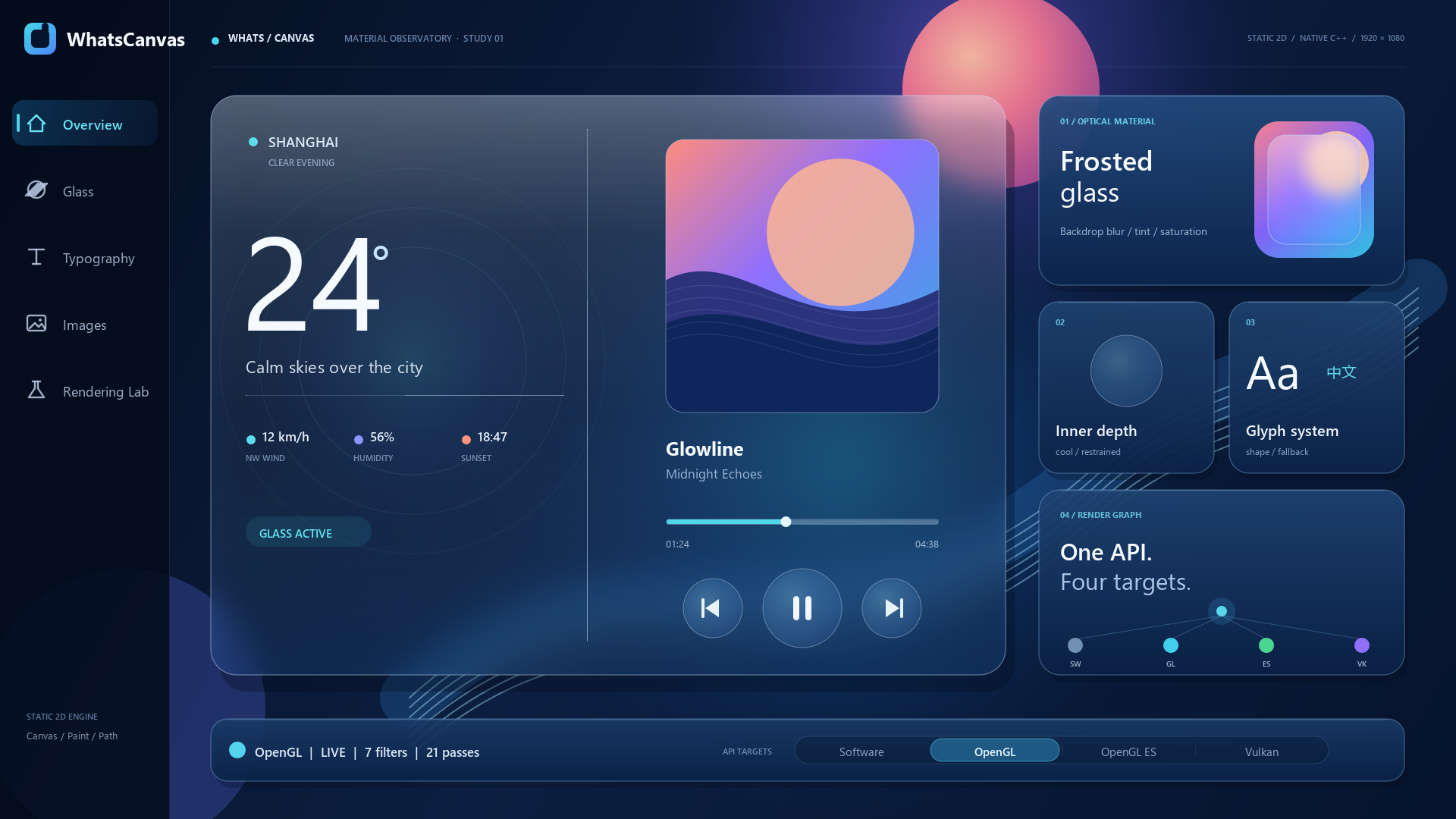
The capture is a complete 1920 x 1080 WhatsCanvas frame. See Image Filters & Frosted Glass for content filters, backdrop filters, inner shadows, color matrices, offsets, and ordered filter chains.
Read the result back¶
std::vector<unsigned char> rgba;
canvas->endFrame();
canvas->readPixelsRGBA(rgba);        // tightly-packed, top-left-origin RGBA8
canvas->savePixelsPPM("frame.ppm");  // or feed `rgba` to your own PNG encoder
Choose where frames go — setOutputTarget¶
A single "output axis" decides where a canvas delivers each frame. Set it once
with setOutputTarget, then use one frame loop everywhere:
beginFrame → draw → endFrame → present. present() swaps/blits for a Window
target and is a no-op for the others; read pixels with readPixelsRGBA.
OutputTarget |
Where the frame goes | Deliver with |
|---|---|---|
Offscreen() (default) |
canvas-owned image | readPixelsRGBA |
OffscreenTexture() |
canvas-owned image, usable as a texture (drawImage) |
readPixelsRGBA / as ITextureSource |
ToWindow(surface) |
an OS window (library owns the swapchain/blit) | present() |
GLFramebuffer(fbo, w, h) |
a host-owned GL framebuffer (embed) | your engine |
VulkanImageTarget(image, fmt, w, h) |
a host-owned VkImage (embed) |
your engine |
setOutputTarget returns false when a target is unsupported for the current
backend/platform, so you can fall back. On-screen present is implemented for
software (Windows GDI + Linux X11), OpenGL (WGL; GLX on Linux) and
Vulkan (Windows, validated), and Metal (CAMetalLayer on Apple platforms).
Present to a window (WhatsCanvas does not own the window — you create it and hand over the native handle):
using Backend = wsc::Canvas::Backend;
auto canvas = wsc::Canvas::create(Backend::Software, width, height);   // or OpenGL / Vulkan / Metal
// Initialize before setOutputTarget. For OpenGL, make the context current and
// call Canvas::loadOpenGL(...) first; Software/Vulkan/Metal need no GL setup.
canvas->initializeContext();

wsc::NativeSurface surface;
surface.platform = wsc::NativeSurface::Platform::Win32;
surface.window   = /* HWND, e.g. glfwGetWin32Window(window) */;

if (canvas->setOutputTarget(wsc::OutputTarget::ToWindow(surface))) {  // false if unsupported
    while (running) {
        canvas->beginFrame();
        /* draw ... */
        canvas->endFrame();
        canvas->present();                 // swaps/blits to the window; resizeOutput(w,h) on resize
    }
}
Runnable demos:
software_present,
gl_present,
vulkan_canvas_present,
metal_present.
Embed into an existing renderer — draw into your GPU target instead of a
window (no present(); your engine composites/presents its own target):
// OpenGL: your context must be current and Canvas::loadOpenGL called (section 2).
auto canvasOwner = wsc::Canvas::create(wsc::Canvas::Backend::OpenGL, width, height);
wsc::Canvas &canvas = *canvasOwner;
canvas.initializeContext();
canvas.setOutputTarget(wsc::OutputTarget::GLFramebuffer(myFbo, width, height));

while (running) {
    canvas.beginFrame();
    /* draw ... */
    canvas.endFrame();                 // rendered into myFbo; your engine uses/presents it
}
// Vulkan: allocate an R8G8B8A8_UNORM VkImage (COLOR_ATTACHMENT + TRANSFER_SRC
// usage) on the canvas's device, obtained via the interop accessors.
auto canvas = wsc::Canvas::create(wsc::Canvas::Backend::Vulkan, width, height);
canvas->initializeContext();
VkDevice dev = static_cast<VkDevice>(canvas->vulkanDevice());
VkImage  hostImage = /* vkCreateImage(dev, ... R8G8B8A8_UNORM,
                        VK_IMAGE_USAGE_COLOR_ATTACHMENT_BIT |
                        VK_IMAGE_USAGE_TRANSFER_SRC_BIT, ...) + bind memory */;

canvas->setOutputTarget(
    wsc::OutputTarget::VulkanImageTarget(reinterpret_cast<void *>(hostImage),
                                         VK_FORMAT_R8G8B8A8_UNORM, width, height));

while (running) {
    canvas->beginFrame();
    /* draw ... */
    canvas->endFrame();                // hostImage now holds the rendered frame
}
See tests/VulkanWrapExternalTests.cpp
for a complete, runnable Vulkan example (image allocation + readback check).
6. Verify before shipping¶
Recommended local checks before publishing an integration:
ctest --test-dir build -C Release -L unit --output-on-failure
cmd /c scripts\smoke_test.bat
cmd /c scripts\text_pixel_regression.bat
cmd /c scripts\opengles_build_smoke.bat
cmd /c scripts\package_consumer_smoke.bat
ctest --test-dir build -C Release -L unit --output-on-failure
ctest --test-dir build -C Release -L metal --output-on-failure  # Apple only
sh ./scripts/smoke_test.sh
sh ./scripts/text_pixel_regression.sh
sh ./scripts/opengles_build_smoke.sh
sh ./scripts/package_consumer_smoke.sh
See doc/REGRESSION_BASELINES.md for the baseline policy and
doc/API_STABILITY.md for the public API boundary.
7. Where to go next¶
- API Reference — every public symbol.
- API Stability — what is guaranteed stable.
- Text Feature Matrix — text/font capabilities.
- Vulkan backend status — enabling Vulkan.
- iOS Build Notes — Metal/GLES integration and Apple-device validation boundaries.
- Runnable examples:
examples/andtests/package_consumer.